
Got my 4in skyjacker lift finished up today , mounted my 35s on it and it was 2.5in higher in the back. Come to find out it was 4in springs in front and 6in in the rear. ( looked like a 69 Chevelle with raised shackles getting ready to make a pass ) Apparently the company I bought it from had some complaints on the K5 "sag" in the rear with 4 in the front and back so they started putting 6in in the rear with the 4in lift. According to their web page that combo is used for 69-72 blazers and some burbs. Mine is a 91 Jimmy and it looked FREAKING STUPID ! SOOOOO took them back off and headed 225 miles away in the morning to get the 4in springs. Hopefully that will be the look that Im trying to achieve, I don,t mind a little sag in the back,Hell thats just the way they are. I did install all new cab mount bushings and gained 5/8in in the rear. Anyway to anyone that may be looking to do that on 73-91 DONT!!! Unless you want a K5 dragster. I guess Im gonna use the 25 dollars that I was going to use to become a full member here on gas tomorrow. HIGHLY DISSAPOINTED !!
CK5

You are using an out of date browser. It may not display this or other websites correctly.
You should upgrade or use an alternative browser.
You should upgrade or use an alternative browser.
4in front springs 6in rear. NOT COOL !!!
- Thread starter thejimmy
- Start date

I`m sorry... but LOL we need some pics.
And some pics after the fix.
Welcome!
And some pics after the fix.
Welcome!

Stock Jimmy
1/2 ton status
Plz show. I am 1 in higher in the rear and its good to look at. 2.5 would be different though I guess  show pics when you can plz. ty
show pics when you can plz. ty
dirtygoat
1/2 ton status
Guess I need to pay my 25 bucks to post some pics huh.
The $25 is worth being able to see everything, but you can post pics from photobucket or the such without a membership... Click on IMG code next to the pic and paste it in your post...

stumpbuster
1/2 ton status
are the springs interchangeable from front to rear by any chance?
prolly a dumb question sorry
prolly a dumb question sorry

are the springs interchangeable from front to rear by any chance?
prolly a dumb question sorry
Nope....and yes, with extensive mods you could run the rear springs up front, many of us do!

need pics, I will probably like it 

4xcrazy
3/4 ton status
If I remember right, don't the springs settle some after being driven on for a bit anyways, it may tame down on the rake with some miles on them. I know my ride quality changed quite a bit after about a month of driving on them.
Took the 6in springs back and got the 4in put on today,looks perfect (to me). 7/16 higher in the back, but thats with new body mounts and every thing, Im sure it will settle a little bit. I ll post some pics of both ways as soon as I can figure out how.
Glad it worked out for you.
Photobucket is actually easy...I`m no expert ,and it took me forever to figure it out but if I can do it you can too. Sorry no good tips for you, If you ask someone else will tell you how to do it, I`m the sh#ts at explaning things on the computer.
Photobucket is actually easy...I`m no expert ,and it took me forever to figure it out but if I can do it you can too. Sorry no good tips for you, If you ask someone else will tell you how to do it, I`m the sh#ts at explaning things on the computer.

If you'd like to include pictures within your posts and/or would like to maintain your own independent photo album, this guide is for you. (This will also allow people to see your images without having to be logged in).
There are many places to host pictures including Yahoo!'s flickr.com, Google's Picasa and Photobucket. I'll focus on the later, as it's the easiest to suss out for posting pictures on a forum such as this one.
1. The first step is obviously to create an account on your desired image host. For this example we're using Photobucket. Navigate to http://photobucket.com and click the "Join Now" button.

Fill out the signup form to start your account.
2. Now that you've started an account, you can upload photos to your album. Go to "My Account" and you'll be presented with the option to upload pictures. If you don't see a link for "My Account," go back to the front page http://photobucket.com/ and you'll see it as a tab, or you'll need to sign in.
Your account page may look something like this:

You'll see a few buttons which read "Choose File." Click them and select the picture(s) you'd like to upload, when you are done choosing the pictures to upload, click the "Upload" button. Once the status bar reaches 100%, you'll have photos in your album!

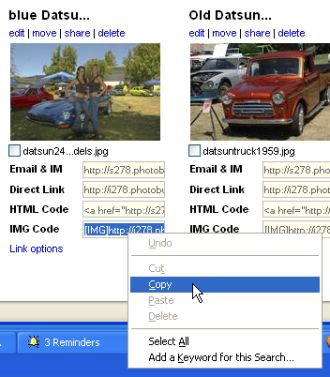
3. Scroll down in your album, and you'll see the images you just uploaded. Underneath each image should be various shortcuts, the one we're interested in for posting on this forum is "IMG Code." Copy that content and paste it into your posts -- it's that easy.
Right click on the text that starts with [ IMG ]
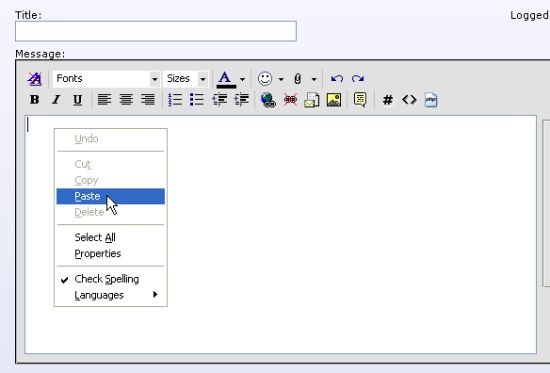
Go to the forum in another browser window or tab. In your post or reply, right-click again and choose paste.
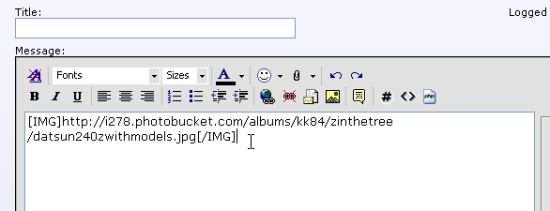
The image tag will appear. Now add text and finish your post.
There are many places to host pictures including Yahoo!'s flickr.com, Google's Picasa and Photobucket. I'll focus on the later, as it's the easiest to suss out for posting pictures on a forum such as this one.
1. The first step is obviously to create an account on your desired image host. For this example we're using Photobucket. Navigate to http://photobucket.com and click the "Join Now" button.
Fill out the signup form to start your account.
2. Now that you've started an account, you can upload photos to your album. Go to "My Account" and you'll be presented with the option to upload pictures. If you don't see a link for "My Account," go back to the front page http://photobucket.com/ and you'll see it as a tab, or you'll need to sign in.
Your account page may look something like this:
You'll see a few buttons which read "Choose File." Click them and select the picture(s) you'd like to upload, when you are done choosing the pictures to upload, click the "Upload" button. Once the status bar reaches 100%, you'll have photos in your album!
3. Scroll down in your album, and you'll see the images you just uploaded. Underneath each image should be various shortcuts, the one we're interested in for posting on this forum is "IMG Code." Copy that content and paste it into your posts -- it's that easy.
Right click on the text that starts with [ IMG ]
Go to the forum in another browser window or tab. In your post or reply, right-click again and choose paste.
The image tag will appear. Now add text and finish your post.
super k
1/2 ton status
I'm glad you got that worked out. That's dang silly tossing 6" springs in on a 4" lift. Maybe they should ask the buyer first? Personally,I like the nose slightly up (I don't see it as tail sag). The vehicle actually handles better that way. When people first started lifting 4wds you'd see a lot of tail end higher trucks since the rear was the easy part,yet usually the less necessary for tire clearance.

shovelbill80
1/2 ton status
the heavy cap on a K5 is what makes it ""sag" a tad over a pickup.....far as i know......usually 1" extra will "even" it out, if you keep the cap.


Yep I like the 6" springs I think they would have settled just about right for me.
My last blazers favorite stance was about 2" higher in the back than in the front
My last blazers favorite stance was about 2" higher in the back than in the front
super k
1/2 ton status
Looks like the pictures are swapped left and right. The 4" looks just right. I don't care for the "jacked in the rear" stance. That's for 2wds. A 4wd looks proud with the nose up (level compared to 2wds). I like the way they handle better,too. I drive a lot of old high crown not so smooth back roads and feel a vehicle pulls straighter with the weight transfered off the front axle a bit. The rear just follows the front rather than toss around.
Stock Jimmy
1/2 ton status
Theres the magic 1 inch lol. And yes... It will settle
But It wont have a saggy ass
Cant wait too see it
But It wont have a saggy ass
Cant wait too see it
Stock Jimmy
1/2 ton status
Nor call chris.. ty You made me want too show my Green Monster now too You guys 11 yrs of pics ty
11 yrs of pics ty


