I did not read all of this but here is a link.
http://members.cox.net/vipir14/gmgauges.html
General Motors 0-90 Ohm Gauge Diagnosis Procedure
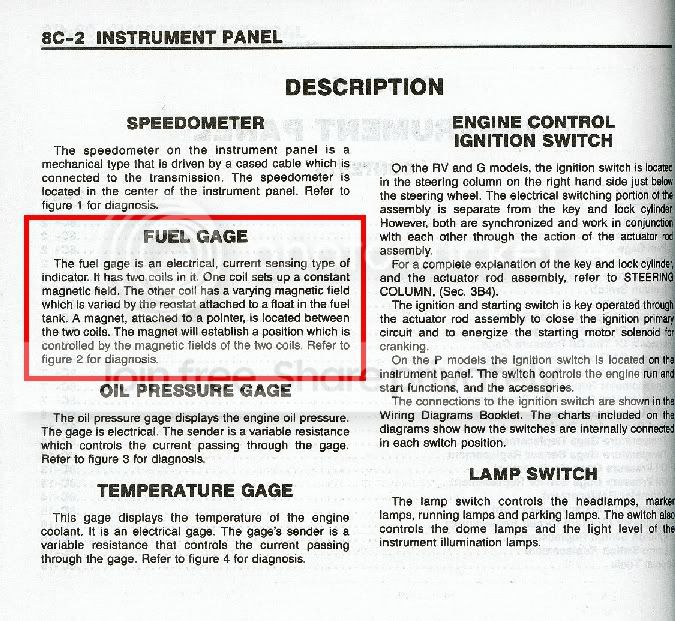
Especially as cars age, it is often somewhat difficult to pinpoint the root cause of instrument cluster gauge failure, thanks to questionable wiring, normal wear and tear, and sometimes even incorrect diagnosis procedures. The following diagnosis procedure is the method that GM publishes in it's shop manuals, will work on oil pressure, temperature, and fuel gauges, and should apply to all but the most recent GM-made vehicles with computerized gauges.
Before You Begin
You will need either
Kent-Moore tool J-24538-A, if available, or tool JG-GM-1, a homemade GM gauge testing jumper. To build tool JG-GM-1, you will need the following materials:
- 1 Jumper wire with alligator clips (about $2 US from Wal-Mart)
- 1 220 ohm, 1/2W resistor (Radio Shack #271-1109, pack of 5, $0.99)
- 1 150 ohm, 1/2W resistor (Radio Shack #271-1111, pack of 5, $0.99)
- about 1" of 1/4" heat-shrink tubing, or vinyl electrical tape
Construct the jumper as follows:
- Cut the jumper wire in half, and strip about 1/8" of the insulation off of the cut end of each wire. Tin the bare wires using a soldering iron.
- Take both resistors and twist their leads together on each end, so that the resistors are joined in parallel. Twist the leads tightly, cut off the excess, and tin the twisted leads. If using heat-shrink tubing, make sure that the resistor assembly is about half the length of the tubing, or less.
- If using heat-shrink tubing, slip the tubing over one of the jumper wire halves.
- Solder each half of the jumper wire onto the opposite ends of the resistor assembly.
- If using heat-shrink tubing, slide the tubing over the resistors and solder joints and shrink using a low-temperature flame or hair dryer. If using electrical tape, tightly wrap the tape around the resistors and solder joints, ensuring that the solder joints are completely covered.
Diagnosis Procedure
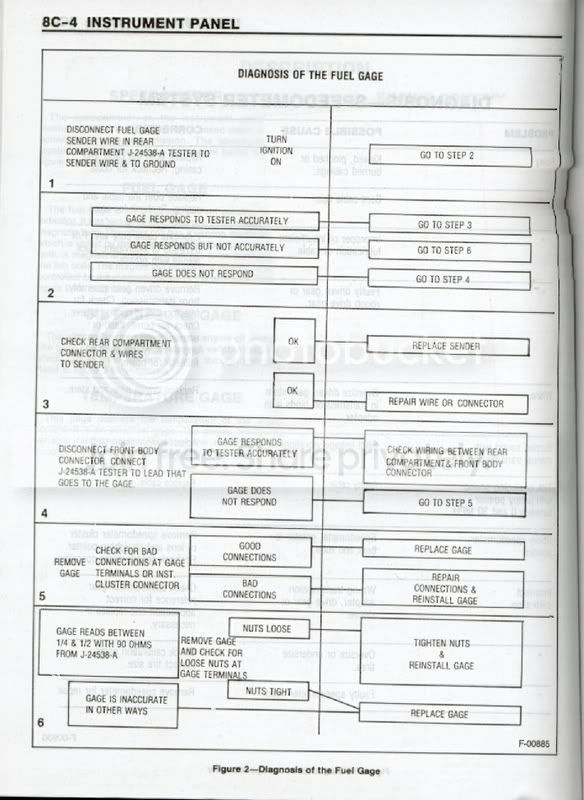
- Disconnect wire from sending unit, and connect tool JG-GM-1 from the wire connector to ground.
- Turn ignition ON.
- If the gauge being tested reads at the high end of the scale (i.e. full for gas, 60psi for oil, etc.), the sending unit is at fault and must be replaced. Retest after sending unit replacement.
Else, go to step 4.
- If the gauge responds, but not accurately, go to step 5.
If the gauge does not respond at all, go to step 7.
- Disconnect engine harness connector at firewall bulkhead. Connect tool JG-GM-1 from ground to bulkhead connector lead that goes to gauge. If the gauge now responds accurately, check the wiring between the sending unit connector and the engine harness connector, repair any faults, and retest.
Else, reconnect the engine harness connector, and go to step 6.
- Remove the gauge from the instrument cluster and check the speed nuts holding the ceramic shunt across two terminals on the back. If they are loose, tighten them and retest gauge; if tight, the gauge is at fault and must be repaired or replaced.
NOTE:You might be able to repair the gauge with a kit from Fix-A-Gauge, and/or you might be able to manually reposition the needle where applicable. Retest after repair.
- Remove the instrument cluster and check for bad connections at the gauge terminal clips, instrument cluster connector, and both the instrument cluster and sending unit ground. If the connections are good, inspect the wiring from instrument panel to firewall harness connector, and repair any faults if found; if bad, repair the connections, reinstall gauge, and retest. If the connections and wiring are both good, the gauge is at fault and must be replaced.
NOTE:A gauge diagnosed as bad through this step most likely can not be repaired.