CK5
Register an account today to become a member! Once signed in, you'll be able to participate on this site by adding your own topics and posts, as well as connect with other members.

Dual Circuit Windstar Fan - Final Shroud Update 05/11/11

Lunatic

1/2 ton status
Joined
Jul 27, 2008
Posts
439
Reaction score
4
Location
Ft Hood, Texas
So I picked up a Windstar fan - $28.00 US...... A good buy from the local yard I think - Being as a new one runs $100.00 US on the web.

I grabbed the harness as well, cut where the 10g wires (for some reason) merge into about 5 smaller wires for each leg. :confused:

So how do I hook this up ? I've read about thermal switches etc but am not certain what to look for or where to put them. Also - relays - are somewhat new to me.

So before I even start, would anybody care to shed some light on the subject of actually connecting the electrical circuits for this fan ?

Any help is greatly appreciated !


Lunatic
Ft Hood, TX


86 GMC Jimmy / 350 / 700r4 / NP208
 
Last edited:
$28.00 US...... A good buy from the local yard I think - Being as a new one runs $100.00 US on the web.

I grabbed the harness as well, cut where the 10g wires (for some reason) merge into about 5 smaller wires for each leg. :confused:

So how do I hook this up ? I've read about thermal switches etc but am not certain what to look for or where to put them. Also - relays - are somewhat new to me.

So before I even start, would anybody care to shed some light on the subject of actually connecting the electrical circuits for this fan ?

Any help is greatly appreciated !


Lunatic
Ft Hood, TX


86 GMC Jimmy / 350 / 700r4 / NP208


I think Mnstrburbon did the windstar fan conversion on his burb. I think he has a build thread with this info in it. He's who you probably want to talk to.


EDIT: here is his thread. Around post #103 I think is some info you want/need.

http://coloradok5.com/forums/showthread.php?t=233479
 
Thanks guys

Post #103 - Thats spot on, rdn2blazer. But mnstrburbon only posted pics of the install and no actual useful information to my situation (wiring). I just flipped through his whole thread - Impressive build - Thanks for pointing me to it.

I'll read the chevelle write up now - Thanks Nazarethk5


EDIT

Theres some good information in both threads. And even more clicky's in the chevelle thread.

I think I have it almost understood - Just a few lingering questions remain. I sent mnstrburbon an email asking for his input in this thread. I hope he gets it - I didnt get a confirm of the message actually being sent.

Thanks again for the input !

END EDIT


Lunatic
Ft Hood, TX
 
Last edited:
Thanks guys

Post #103 - Thats spot on, rdn2blazer. But mnstrburbon only posted pics of the install and no actual useful information to my situation (wiring). I just flipped through his whole thread - Impressive build - Thanks for pointing me to it.

I'll read the chevelle write up now - Thanks Nazarethk5


EDIT

Theres some good information in both threads. And even more clicky's in the chevelle thread.

I think I have it almost understood - Just a few lingering questions remain. I sent mnstrburbon an email asking for his input in this thread. I hope he gets it - I didnt get a confirm of the message actually being sent.

Thanks again for the input !

END EDIT


Lunatic
Ft Hood, TX


Shoot him a PM, see if he has any info he's willing to share. Never hurts to ask. He's a cool guy. He's always helpful.
 
I just redid my whole electrical system check the end of the build for the stainless panel with 5 relays the one that is different is the painless one. But here are the basics i have set up 2 systems this ways with good results.

Painless thermal switch they offer 2 different temp settings i did the lower one turns ON at 205 IIRC. ON that kit it requires a key on hot source i used a spot on the fuse panel ACC. I pulled power from there to activate the painless relay and also power the dead man switch or over ride for the second fan. I added a regular Bosch 30Amp relay for the second fan and used the trigger wire from the switch to open it.

SO power from acc source on the panel goes to painless kit, and to toggle switch, out of toggle to 30 Amp relay. Power from battery fused to both painless relay and Bosch relay, grounds from the battery to relay. Hot wire out of relays to fan positives there is 3 or 4 wires i made them only 2 power feeds, Grounds on fans to battery negative. Temp switch is in the top of the manifold (eldelbrock) Or you can find a junk yard late model water neck with a threaded insert for the sender. Painless sensor wire from relay to sender and then a ground from sender to manifold or alternator bracket.


On a side note i ran another relay wired in to the painless controlled fan power feed only so if the painless kit fails i can override with the toggle switch. I also have the extra relays mounted right there so if there is a trail failure i simply un plug and move it over to a spare.
Pm me if you have any questions the painless kit has good directions i think it runs $50 or so
 
PM ? Whats that ? Its a reference to the time of day, for my non-subscribed simplton self. About 2 years ago I subscribed for a year. It ran dry. I didnt justify a renewal then nor now - Just to look at build pics, loose the advertisments, and have the ability to PM. Oh, and the snazzy member icon under my user name. Hmm.

But, as my wife just stated - Dont compare it to other websites and how they run their show. Drop it down a few bars - Compare it to the Four Wheeler and 4 Wheel Offroad subscriptions I maintain, but only flip through on occasion.

With that statement, I re-subscribed to CK5 for another year. I'll leave the rest of my commentary off the keyboard. There's plenty of people on the web that have already wasted time with ranting over the board's chosen settings.


Anyways, moving forward.....


Thanks for all the input you've given rdn2blazer. In three days time, once the e-check thing goes through - I'll be able to PM mnstrburbon if he hasnt already found his way to this thread.


Today I started mounting the fan itself. Im not going about it in the same way as many of the past did. If you look through my profile, good is "good", but not good enough. My hours of work left me little to show. I will be posting pics, practically step by step of my install ...Once the e-check thing goes through.


I think it will be worth anyone's time to stay tuned or to start tuning in. Its the same apple sure - But this one will have a different taste. :whistle:


EDIT
Thanks for joining us, mnstrburbon - I was hoping that email made it to your inbox.

In the next few evenings I'll be drawing a schematic of sorts for the layout of circuits and posting it as a pic. Being that I dont know symbols and such without looking them up, it will be a KISS schematic - which anyone, from my novice level and up, can make sense of easily. I am tracking on what you described above for connections.

I decided last night to turn this thread into a source thread, instead of another "Here's some pics of a Windstar fan I installed" Q and A type thread - More of an instruction / how to thread.

Your input is appreciated and already a value to this thread - Thank you.

END EDIT


Lunatic
Ft Hood, TX
 
Last edited:
PM ? Whats that ?

Thanks for all the input you've given rdn2blazer.


No problem, happy to help a little atleast. You probably have figured it our but PM is private message. Post up some pics when you can.
 
PM ? Whats that ? Its a reference to the time of day, for my non-subscribed simplton self. About 2 years ago I subscribed for a year. It ran dry. I didnt justify a renewal then nor now - Just to look at build pics, loose the advertisments, and have the ability to PM. Oh, and the snazzy member icon under my user name. Hmm.

But, as my wife just stated - Dont compare it to other websites and how they run their show. Drop it down a few bars - Compare it to the Four Wheeler and 4 Wheel Offroad subscriptions I maintain, but only flip through on occasion.

With that statement, I re-subscribed to CK5 for another year. I'll leave the rest of my commentary off the keyboard. There's plenty of people on the web that have already wasted time with ranting over the board's chosen settings.


Anyways, moving forward.....


Thanks for all the input you've given rdn2blazer. In three days time, once the e-check thing goes through - I'll be able to PM mnstrburbon if he hasnt already found his way to this thread.


Today I started mounting the fan itself. Im not going about it in the same way as many of the past did. If you look through my profile, it states I am a perfectionist. Good is "good", but not good enough. My hours of work left me little to show. I will be posting pics, practically step by step of my install ...Once the e-check thing goes through.


I think it will be worth anyone's time to stay tuned or to start tuning in. Its the same apple sure - But this one will have a different taste. :whistle:


EDIT
Thanks for joining us, mnstrburbon - I was hoping that email made it to your inbox.

In the next few evenings I'll be drawing a schematic of sorts for the layout of circuits and posting it as a pic. Being that I dont know symbols and such without looking them up, it will be a KISS schematic - which anyone, from my novice level and up, can make sense of easily. I am tracking on what you described above for connections.

I decided last night to turn this thread into a source thread, instead of another "Here's some pics of a Windstar fan I installed" Q and A type thread - More of an instruction / how to thread.

Your input is appreciated and already a value to this thread - Thank you.

END EDIT


Lunatic
Ft Hood, TX


Gotta subscribe. These fans have always intrigued me. Someday I'll have to do this setup. Loofing forward to your detail install.:D
 
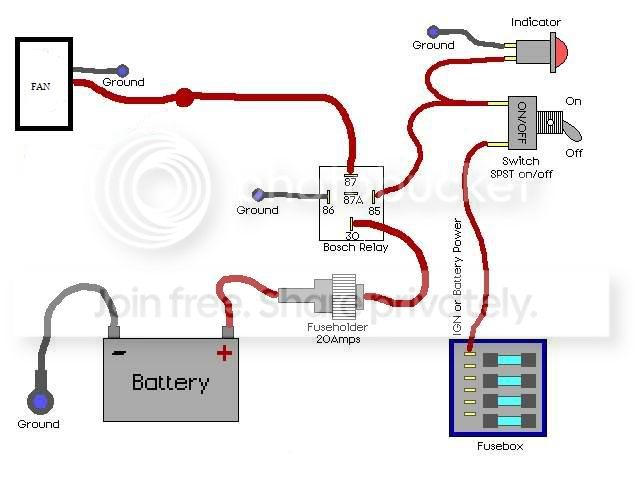
Relay wiring here you go all laid out, indicator light optional, and use a 30 amp fuse NOT a 20 amp.
foglite.jpg
 
That's good if you are running it from a switch.

If you want to run it automatically, delete the switch, run ign power right to the relay. Take the ground side of the relay and put it to a temp controlled fan switch. This switch will screw into the intake or cyl head or wherever you have a coolant passage. They are available at parts stores or online at varying temp settings. It's a one wire hookup, the circuit grounds the relay through the switch at the specified temp and then opens the circuit when it cools off to a specified temp.

I've used this set up several times. Runs automatically, never have to think about it. Make sure the temp switch matches whatever t-stat your are running. Ex: if you're running a cooler 180 t-stat you need a cooler temp switch (on 195 off 180 or something like that).

Not to complicate things but, you could run 2 ground wires off the relay. One to the temp switch. One to a manual switch and then to ground so you can manually turn the fan on if needed.
 
rdn2blazer, I was being sarcastic at the time – Registered non-members do not have the privilege of private messaging. Thanks for clearing that up though. :D


Big Blzn, This will be a detailed thread of how I install the fan set in my truck. Being how straight forward the task is already of mounting, hook up, and running – The only difference I'll actually be providing is a different grade of finished product – It will look factory installed.

Many people may use some of the info or possibly even all of the info to install their own fan set to their own liking and finish. Thanks for showing interest in “another” Windstar thread.


mnstrburbon, 496truck – Ill be running two lighted toggle switches (A/B), one thermal switch (A), two indicator lights (showing fan A/B is on), possibly two diodes for voltage spike discharge (A/B), two relays (A/B), two 30A fuses, and two distribution blocks (+/-) (Something Ive been wanting to add, and this seems a good time being that an electric water pump is chasing this install and HD headlight harness is already installed.).

I have a diagram almost completed and will show it in this thread once it is done. With any luck (after all my reading around the web), it will be approved by people with more knowledge on the topic, such as yourselves, and become one (important) step completed in this project.


Thanks for all the input !


Lunatic
Ft Hood, TX
 
Last edited:
I would recommend the temp switch I have forgot to turn mine on once so far no damge but it got hotter then I like it too.
 
Lunatic, I am subscribing to this thread because this is something I want to do to my Blazer. Also, if you need/want help feel free to ask seeing as we live and work so close by. I'm in 3d ACR.
 
I would recommend the temp switch I have forgot to turn mine on once.....

The toggle for the coolant temp switch would be to cut the main fan off for water crossing - Nothing more. It would return to the running position right after hitting the other bank. The second toggle would be a manual control point for the secondary (smaller) fan.


Recon - We may have already crossed paths. Got a truck description ? I'll keep an eye open for you. Ive been thinking about tagging my rear windshield with ......"Lunatic coloradoK5.com"...... to be easily spotted. Then CK5 could pay me for advertising :haha:


Troy B
Ft Hood, TX
 
Recon - We may have already crossed paths. Got a truck description ? I'll keep an eye open for you. Ive been thinking about tagging my rear windshield with ......"Lunatic coloradoK5.com"...... to be easily spotted. Then CK5 could pay me for advertising :haha:

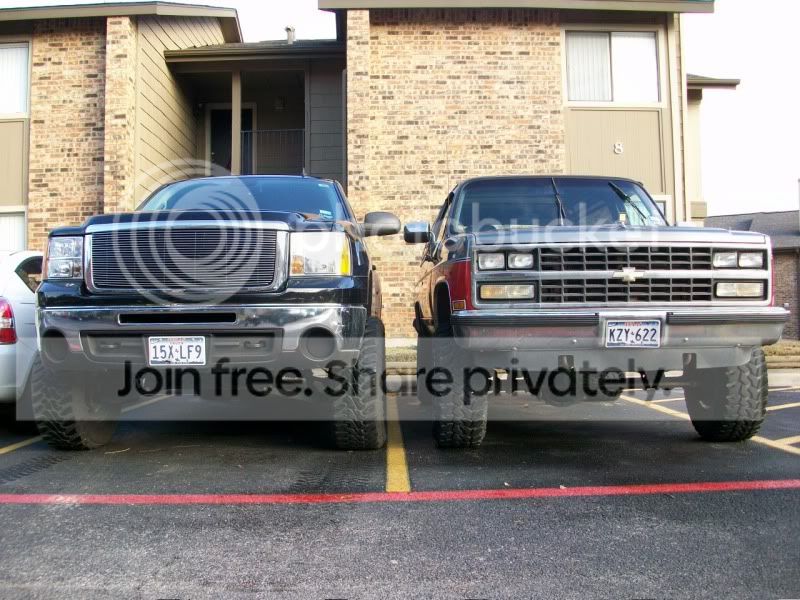
These are my rides
100_0111.jpg


Obviously not taken today!
 
Only in Texas can it be 78* on Sunday and then covered in snow on Tuesday..... :dunno: :screwy:


Lunatic
Ft Hood, TX
 
It is a dual fan from a Ford Windstar which covers the radiator almost completely, thus the title of "direct drop in".

However it does leave a gap above and below thats about 1 - 1 1/2". Even without a shroud though, it moves more air that the stock fan on the mechanical clutch.

The MkVIIIs IIRC are squares which cover less and draw higher amps. Due to the MkVIII coverage difference (or lack there of), the air it moves through the radiator itself is actually almost the same if not less than the Windstar dual. So all you actually get from a MkVIII is more amp draw.

Is what Ive read around the web anyways - Read it as you choose...

([URL="http://img535.imageshack.us/img535/4272/windstarfan.jpg"]Direct Image Link[/URL])


windstarfan.jpg


Lunatic
Ft Hood, TX
 
Last edited:
Moving forward.......

Once again - Thanks for all the help provided by rdn2blazer and mnstrburbon for helping me get this install off the ground.

I intend to become the lead CK5 pic ho through this thread - You were all warned ! Well.....Ryoken may have that title un-disputably - But Ill settle for 2nd :D

So on with the show.


------------------------------------------------


I'll start the with the reason this thread was started - The wiring diagram. I will NOT be running diodes. If the fans backfeed, they're more than welcome to take out the relay. I left them (diodes) in the diagram after finishing it because it is a technically "proper" item.

The thermal switch is one for a LIGHTED gage, not a needle gage with temp readings. The light comes on (on/off switch) once temp reaches warning stage. Or, as with this use, the fan comes on to cool things off. A switch for the temp gage (needle type) is incremental - I dont suggest trying this type.

Any questions ? Just ask.


Post20.jpg


Here is the fitment of the fan assembly. It leaves three core rows exposed total. Ill be leaving two on top and one below. Side to side, the fan assembly has full coverage. It is hanging <on center> of the radiator core.


RHClearance0250.jpg


RHClearance0150.jpg


LHClearance0250.jpg


LHClearance0150.jpg


TopClearance0250.jpg


TopClearance0150.jpg


Heres a layout of some of the items I finally now have (Thus the delay in progress).


Layout0150.jpg


Layout0250.jpg


Layout0350.jpg


Layout0450.jpg


Layout0550.jpg


The fitment pics shows something which brings up the next group of pics. But I'll hold off until tomorrow. The layout pics show something else which leads to another frenzy of pic ho'in too.


But........Thats it for now - Stay tuned or tune in - Either way - This promises to be unlike any Windstar install you've seen to date.


Questions and comments welcome of course.


Troy B
Ft Hood, TX
 
Last edited:

Latest Posts

Top Bottom