CK5
Register an account today to become a member! Once signed in, you'll be able to participate on this site by adding your own topics and posts, as well as connect with other members.

Looking for a DPST

I like your circuit however, that's the DPST I can't find. Can't find a good looking one a DPDT either. And, I'm not trying to nit pick, I appreciate your knowledge, just being clear for anybody else that happens to be reading along, some of the polarities are backwards. Chevy wiper motors have a constant 12v+ on the motor. The switches or in your schematic the relays apply a ground to the motor.

I'll see if I can sketch mine up nice like you have and see what you think of it.

Hadn't thought about inadvertently firing two relays at the same time. I'll look mine over.
 
Nit pick away. I hate nits anyway. I don't think I knew that about the wipers Circuit would still work, just replace the 12 volt input to the relay terminals with grounds, and the other side of the motor with 12v.
 
You're right, my schematic had both the high side and the low side relays being fired by the use of the washer button when running the wipers in the hi speed.

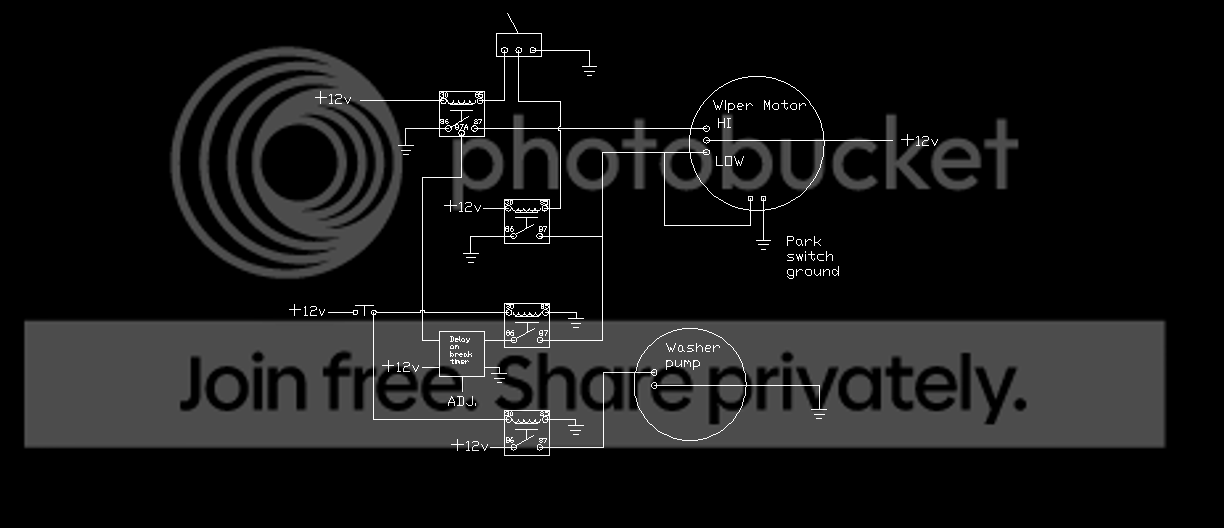
A 5 pin relay that supplies the ground to the low side relay from 87A NC terminal will work for solving that problem. I'll draft it up tomorrow and post it up. I think I can set up a simple test circuit with some light bulbs and test it all out. Then I can figure out how to integrate the wiper delay module. Then i'll see about adding the timer delay to keep the wipers going a second or so longer than the washer pump.

this circuit is getting kinda big! I'm glad I made my electronics control box as big as I did.
 
Ordered some parts for this circuit today.

Got an SPST LED lighted button coming along with the delay timer from amazon and some 5 pin relays. Only had 4 pins at the shop.

crossing my fingers the park switch will work the way I expect it to.
 
I did some more research on that timer. I think it will do what you want, but I bet I could have found one that was easier to set up than that one. I finally found the user manual, and I can see where programming it will be tricky. But once you figure it out, it should be fairly straightforward.
The only problem is setting the time delay. You have to basically know how long you want it to stay on before you program it.

I like the simple ones with a knob that you just turn until the wiper runs as long as you like. But, if you time how long it takes the wipers to make the number of passes you want, then you just put that into the timer and it should work.
Basically, you put the little timer into programming mode, and when you get to the timing length, you short a wire to ground for the length of time you want the timer to run, then open it.
The timer remembers how long you did that.

To tell you the truth, you might want to have a cheap momentary switch handy to help with the programming. You have to connect and disconnect a wire to ground for the number of times corresponding to the function number from the manual.

For instance, to program it for an off delay, which is their name for what you want, you will have to pulse the white wire 12 times. If you are just touching the wire to ground that many times, it would be easy to accidentally hit an extra time or miss a time.

Fortunately, if you do select the wrong function, you can go back and overwrite the programming.

Either way, I think you will be surprised by the size of the darn thing. On Amazon, it looked fairly substantial. But from other pictures, it looks like its about the size of a postage stamp.

I think you will get a manual with it, but here is the link to the one online.

http://www.3rdbrakeflasher.com/documentation/Multifunctional_Timer.pdf

Lots of folks say its best to watch some of the yourtube videos also because the manual is supposed to be hard to understand. That may be true, but it made sense to me. Or at least it seemed to.
Of course, I often work with manuals that have been translated from other languages, so that might have helped.

Let me know how the well the timer works or does not work. I am always on the lookout for useful tools to put in my virtual toolbox.
 
Will do and appreciate the heads up. I thought it looked pretty small in the picture which is a good thing. With all the relays stacking up for this, the control portion is as big as the washer pump.
 
wiper%20washer%20circuit_zpscefotnap.png
 
Almost perfect. Only two problems, and one of them is my fault.
Your drawing for the timer is based on mine. Which is wrong. I drew my timer like the ones I was used to using, but after looking at the operating manual, I realized that this timer is different.
OOPs, I just realized that I was looking at it wrong. You actually have drawn the timer correctly, but its hooked up wrong.
The timer needs to fire the low speed relay, not supply the contacts. Plus you do not seem to have a trigger for the timer. Not sure what the center contact in the high speed relay does. If its an NC, then the timer would be triggered every time the high speed relay turned off.

Since this crazy timer can be setup to trigger on either a high trigger or low trigger, I think you can eliminate one relay, but you need to add a second contact set to the high speed relay.
Let the second contact set connect and disconnect the timer trigger from the pushbutton. Let the timer output drive the low speed relay when triggered from the pushbutton.
Put the low speed wiper switch between the timer output and the relay so it triggers the relay regardless of the timer output.

NOTE: That might not work as is. If you program the timer so that the output goes to ground when triggered, it probably goes to +12 when off. If so, then pulling the output to ground with the low speed switch would short out the timer output.
Two ways to fix that. One: since you already have another relay in the mix, let that relay be in parallel with the low speed timer driven relay. So firing either relay turns on the low speed, but the two relay triggers are separate.

Or, Two: Just put a diode between the timer output and the wiper low speed switch hookup. Then the timer can pull the low speed relay trigger to ground to fire it, or the wiper switch can pull it to ground without the timer being able feed 12 volts to the switch.

I think that all makes sense. Its 1:00 in the morning and I have been up since 3 yesterday morning so I might be starting to fade a little. I need to get up in a couple of hours, climb into a tractor cabin, and finish bottom plowing my little field. Then I have to go to a friend's office and finish setting up a computer network.
But, somewhere in all that, I will try to get a chance to sketch out a schematic or two to show what I am talking about.
 
I think this will work. I used a two pole single throw switch, but a single pole with both leads tied together should work. I also left off the input to the pushbutton switch and the other side of the two relay coils. And I did not include the park switch.
You can put 12v or ground to the switch and the opposite to the coil, just depending on which is easier.
Also to make things easier, I bypassed the low speed relay with the wiper switch, and let it power the wiper directly. That way there is no conflict with the output of the timer.
Since I assume you are using the regular wiper switch, it should handle the load OK.

As you can see, I modified the timer drawing to more accurately reflect the timer you will be using. In the delay on break mode, you would have it powered all the time the ignition is on, but only putting out an output when the trigger is triggered.wiper2.png
 
I like your diagram however, I can't find that DPST or the DPDT momentary in anything suitable. Using a SPST momentary button,

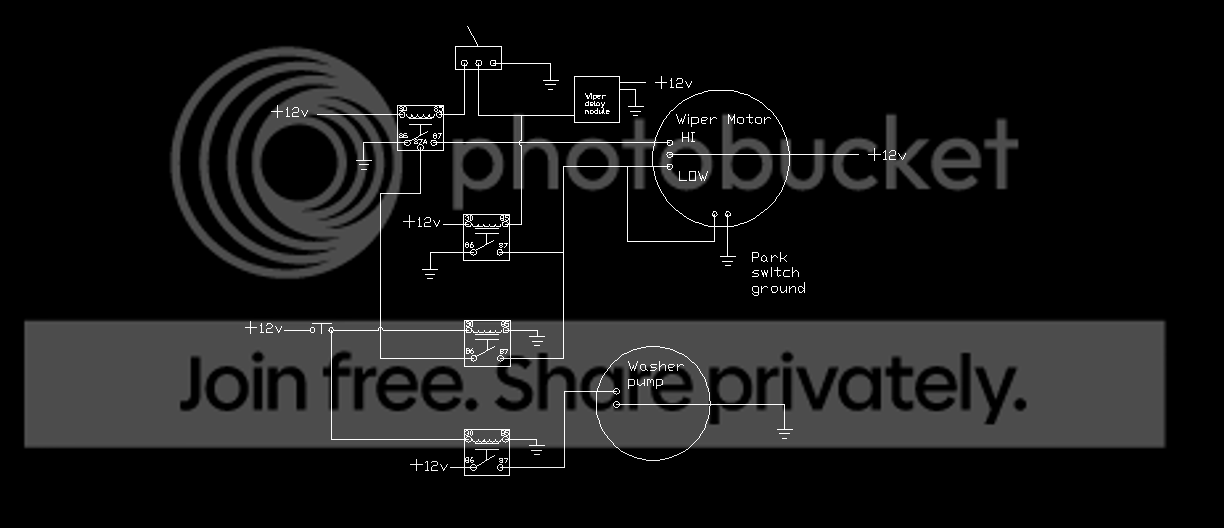
This diagram includes the wiper delay module. I did remove the other delay. I'll put that back in the diagram once it arrives and I better understand how it works.

This delay module simply pulses the control side of the low speed wiper relay. Adjustable from .2 seconds to 35 second intervals. Supposed to be the most adjustability on the market.

wiper%20washer%20circuit_zpsejdvumks.png
 
Last edited:
OH, and I don't think I answered your question Fordum, The 87A contact on the high speed wiper relay is "NC". So when the high speed wipers are engaged, the low speed relay/pump function will be inactive. So the pump would still work but the low speed wipers would not get the ground.

So, high speed wipers with the pump function available and not inadvertently hitting the low side of the motor simultaneously.

So far all of the parts used are pretty commonly available with the exception of the delay module which isn't a mission critical component.
 
Fordum,

I got the time delay piece today. Looking at the manual, seems function 12 would be a pretty straight forward way to program it no?

According to their manual, function 12,

Upon application of input voltage, the time delay relay is ready to accept a trigger. When the trigger is applied, the output is energized. Upon removal of the trigger, the time delay (t) begins. At the end of the time delay (t), the output is de-energized. Any application of the trigger during the time delay will reset the time delay (t) and the output remains energized.

The way I read that, it receives input voltage based on "ignition on." The trigger being the washer button input. Once you push the button for the washers and then release, it would keep the output energized until the time delay expired and then de-energize the output shutting off the accessory.
 
Fordum,

I got the time delay piece today. Looking at the manual, seems function 12 would be a pretty straight forward way to program it no?

According to their manual, function 12,

Upon application of input voltage, the time delay relay is ready to accept a trigger. When the trigger is applied, the output is energized. Upon removal of the trigger, the time delay (t) begins. At the end of the time delay (t), the output is de-energized. Any application of the trigger during the time delay will reset the time delay (t) and the output remains energized.

The way I read that, it receives input voltage based on "ignition on." The trigger being the washer button input. Once you push the button for the washers and then release, it would keep the output energized until the time delay expired and then de-energize the output shutting off the accessory.
Yep, thats the way I read it too. However notice not only do you program the type of timer, in this case, I think 12, but you can also change the type of input and output.
In other words, the trigger can either be +12 or ground, and the output can either be +12 or ground.

Plus, the timer does not start timing until the trigger is released. So you can hold the wash button whatever length of time you want to get the amount of cleaner on the windshield, and the wipers will still continue the same length of time after you release the button.

Like I say, the trickiest part I see is pulsing the program wires the correct number of times. I really suspect you will be better off using a switch instead of just touching the wires together.

All in all, if that module will do what they say it will do, its a pretty amazing little gadget.
 
Yep, I hear ya on the switch. I have a couple of buttons I could set up to do the programming. Starter solenoid type buttons. They should work fine. Probably a light around somewhere as well to give a visual response for being in the right stage of the programming.

It is literally the size of a postage stamp and about 1/8" thick. Apparently some flash memory inside. There are an awful lot of functions packed into that little piece of plastic.

thanks for bringing it to my attention. I think with this last little device, my wipers will work the way I want them to and be constructed from mostly very easily found parts. Again, this gadget, if it were to quit working, you'd still have full wiper function. That is something that is important to me. I like the conveniences, but I want to be able to keep moving if those conveniences happen to fail.
 
I'll redraft the complete circuit one more time, with circuit breakers and the works and post it up, just in case somebody else heads down this path.
 
Top Bottom