

I got it to work but I had to cut and paste each channel bar into my radio's current channel bar file and then clone it..CHIRP wouldn't let me upload the whole file to the radio...it didnt take very long tho


I think you need to import it.I got it to work but I had to cut and paste each channel bar into my radio's current channel bar file and then clone it..CHIRP wouldn't let me upload the whole file to the radio...it didnt take very long tho

 I have the display set to show the name of the channel not the frequency so I don't know how to change the display back without using chirp.
Here' what I'm programming my radio with. Hoping channel 1 will work but we can use 2 or 3 if needed.
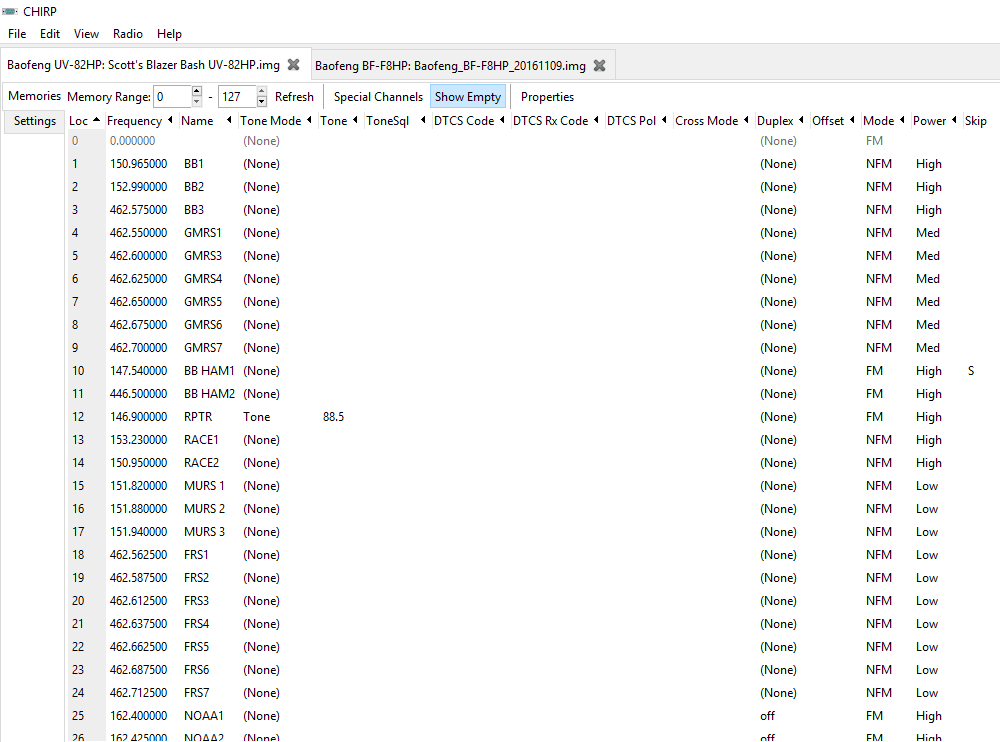
The little cheap handhelds I have to share only work on the GMRS channels so they will operate on channel 3 on this list. My radio is dual band so I'll have it tuned to channel 1 and 3.
See if this works. It's a link to the CSV file you can use in Chirp to import to program your radio (I hope). https://www.dropbox.com/s/5kgu7d9nt45xqaw/Blazer Bash.csv?dl=0

It should have the offset under properties if I did it right. I know I remembered to do it but may not have done it right.I had to cut and past also, as CHIRP would not upload/import to the radio directly. I added 155.160 for search and rescue, just in case. Scott, you might check your duplex/offset setting for the ham repeaters. Your screen shot did not show a " - " or "0.600".
It seems that most radios today are a PITA to program manually. My ham radios 20 years ago weren't too bad. But they did not have the memories or features of today's radios.
I will have a notebook computer and the cloning cable at Moab.

For licensed ham operators attending BB 2017 we have:
KC2AKU
N0SCO
N5CNV
Any other call signs?


I have a handheld ham radio but no operators license yet, sshhhh don't tell anyone. I also have CB in each truck.


