CK5
Register an account today to become a member! Once signed in, you'll be able to participate on this site by adding your own topics and posts, as well as connect with other members.

Windstar electric fans

temp gauge/ mounting plans

Thanks again!

Today's update:

windstar fan 004.jpg The entire time I have owned this rig, The temp gauge has never worked. There was a pipe plug installed where the temp sending unit goes. I also had to hunt down the lone green wire as discussed in a different thread.


windstar fan 005.jpg Temp sending unit hooked up and now the gauge works too! I figured I want to see the temp before & after the swap.
-good start in my book-


windstar fan 006.jpg fan shroud before shot. Look at the gap between the fan blades & shroud. This is PO aftermarket stuff.
This fan blows air forward, I think the electric fans pull the air back which is more efficient. Is this correct?

windstar fan 001.jpg Side by side comparison. Pretty close to the same size.

windstar fan 002.jpg
I am thinking about combining the two into a hybrid Ford/Chevy fan shroud.

windstar fan 004.jpg

windstar fan 005.jpg

windstar fan 006.jpg

windstar fan 001.jpg

windstar fan 002.jpg
 
I can not imagine how a fan blowing forward would work to anyone's advantage. The Windstar draws air from front to rear, from the grill past the engine.

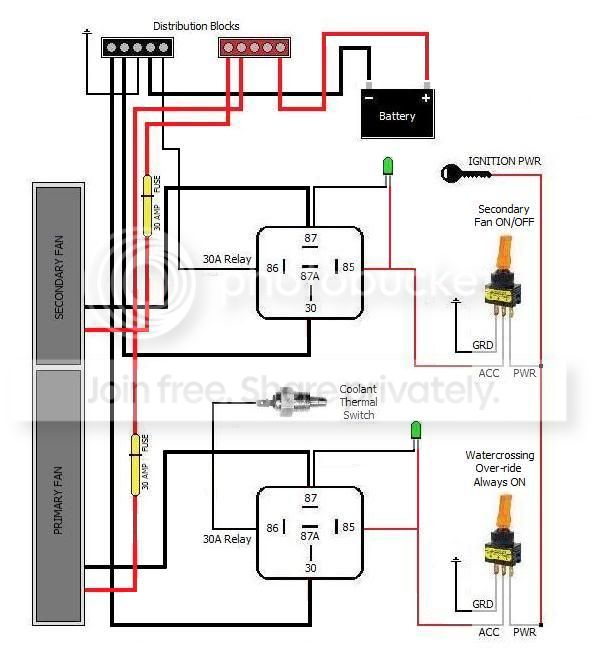
The SPST switches below will control each fan circuit individually, but will only turn the primary off (only). The secondary is a manual fan (only). This is why I changed the entire wiring set up.

Will these help?

FanDiagram2.jpg


FanDiagram.jpg


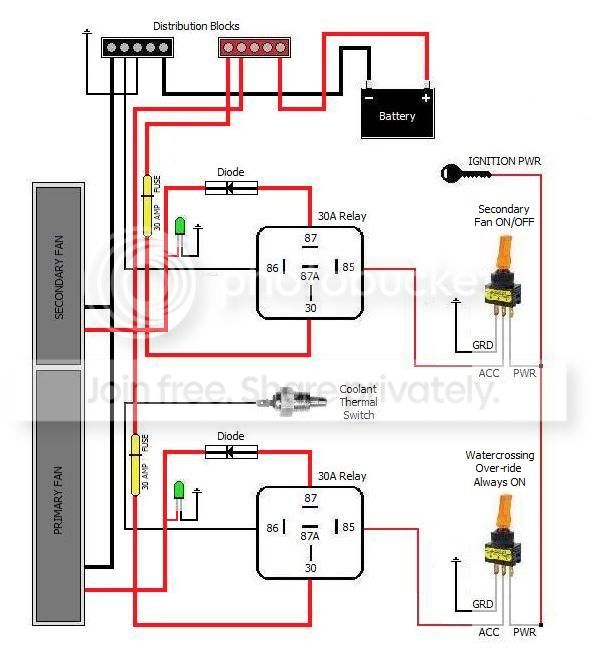
In the current diagram, both are controlled by the sending unit, and can be turned on OR off if necessary.

FanDiagram12-17-2010.jpg


I thought about trying to use the existing shroud also. I think it would be more of a challenge to align the whole idea than starting from scratch. My ideas shouldn't stop you from trying though. It'd be interesting to see the finished product.

Right now, my Jimmy is part Ford, BMW, and Jeep to name a few. :dunno:


Troy B
Ft Hood, TX
 
Maybe I have just overlooked it, but I haven't ever found an answer. My Blazer has windstar fans installed by the PO, one of the fan motors has a 3-wire plug on it. What is the third wire for? Is it possibly a 2 speed fan?
 
Maybe I have just overlooked it, but I haven't ever found an answer. My Blazer has windstar fans installed by the PO, one of the fan motors has a 3-wire plug on it. What is the third wire for? Is it possibly a 2 speed fan?
The larger fan does have a larger three prong connection, but my own only uses two of the prongs (I just went outside and looked) which would be power and ground.

The third prong very well may be for a variable speed provision on later models.

I don't have a definitive answer though, sorry.


Troy B
Ft Hood, TX
 
I ordered some stuff for the install today.

I want to use 1 switch. All the wiring diagrams I see use 2.

I went with the ON OFF ON. DPDT

ON- safety cover up, both fans on with constant power
OFF- safety cover up, both fans off
ON- safety cover down, primary fan with ignition power

I also got a few 6 way power bars and 40 amp relays.

Now I am confusing myself trying imagine how to hook it up. It should be pretty easy though eh?

Any tips, ideas??
 
It will be an easy connection, yes.

ON- safety cover up, both fans on with constant power - As in, you wish to be able to turn both fans sitting in your driveway, not running, no keys ?

ON- safety cover down, primary fan with ignition power - Are you wanting to wire the fans straight through the relay to the switch without using the coolant switch or did you just leave that out of your breakdown ?

Because you only wish to use one switch, you need to decide -- Constant power or ignition power -- You can not have both sources on one switch assembly. I would go with an ignition source, myself.

Once you clarify that, I'll doctor the schematic I have in my old Windstar install thread and post it up for you in this thread.


Troy B
Ft Hood, TX


For reference, until changed for your installation.

FanDiagram12-17-2010.jpg
 
Last edited:
Yes, I was thinking I would have 2 power sources to 1 switch.

[ON] 2 fans on -yes on w/o keys like sitting in the driveway, or desert.

[OFF] ...2 fans off

[ON] 1 fan on while ignition key is on.

No temp control switch.

If I can't both power sources to one switch I choose ignition power. So that would be like this

[ON] 2 fans

[OFF] 0 fans

[ON] 1 fan

...seems pretty simple.
 
Okay, understood.


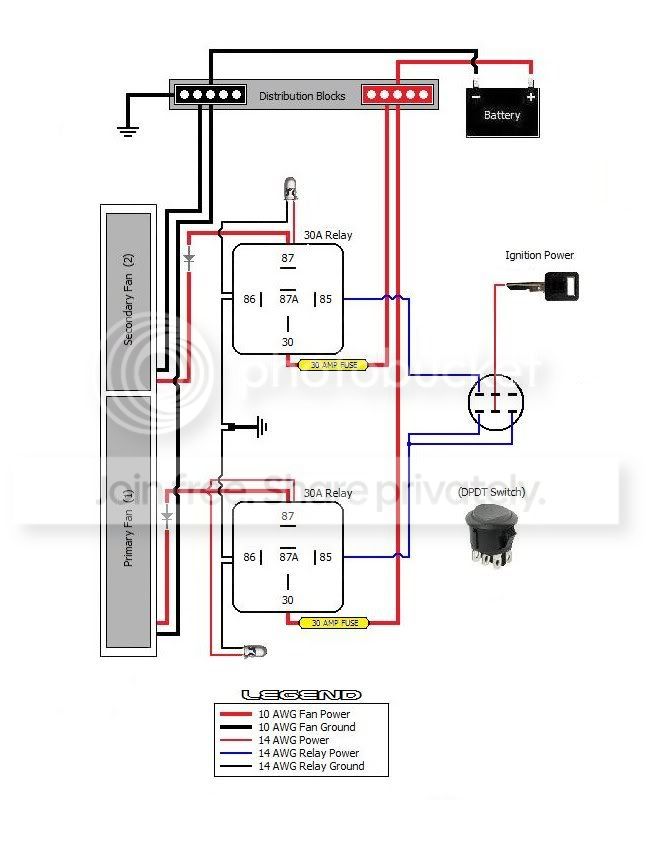
A "just for you" diagram will be up in about 15 min - I already have it done, except omitting the temp switch circuits. :D


Troy B
Ft Hood, TX
 
Awesome!

1- Does the ignition power hook up to both center tabs on the switch? I think yes

2- is that a diode between 87 & the fan?

3- is that an indicator light grounded to 86 & powered by 87?

I ordered 40 amp relays will that be a problem?

Thanks for taking the time to help me.
 
Yes to the first three Qs.

The relay shouldn't be an issue - DO be sure to have a fuse installed for each circuit though.

I help where I can when I can - You're welcome.


Troy B
Ft Hood, TX
 
I finally got my switch & relays in the mail. It took a long time.

Right now I am in the middle of a gear swap, then I am going to hit the trail this weekend. Progress will soon follow. I don't usually leave a project unattended for very long.
 
I'm back. I have the garage clean -er and the fan on the table. I have some electrical questions before beginning the wiring.

1)I had a conversation with an electrician and showed him my ON-OFF-ON DPDT switch. He said if I use a diode I can use constant power on the dual fan on and still use ignition power to power the primary fan on. He even drew me a sketch. View attachment fan wiring.pdf
Any Comments, or concerns on this?

2) I want an indicator light to come on when the fans are OFF. How do I wire it that way?

I will throw up some pics soon.
 
Last edited:
Well, my membership expired - So I can't see the diagram. :doah:

It's been a few days since last looking at this electrical system, but I will say that the indicator lamps operate by switched power, not ground, in the diagram above. To have a lamp ON while the fan is OFF could be done, but by using another item which is not currently in the equation.

A change-over relay would do this. There are two output circuits, but only one can be closed at a time. You could use one output for the fan circuit, and the other for the indicator. BUT, this would only be effective from behind the relay, not in front of. In other words, say your fan motor bugs out - All power is still present, to include to the relay. So, you indicator wont light because the circuit is still good and working properly.

I think the better solution would be a individual circuit for the fan OFF indicator.

I'll think on this one - All sorts of ideas bouncing around in my head.


Troy B
Ft Hood, TX
 
Last edited:
I have it all wired up using the wiring diagram above but It's not working.

There are a few exceptions.

1) I don't have an indicator light hooked up yet, but I grounded 86 anyway.

2) I don't have a diode from 87 going to the fan. Is that my problem?

I'm guess I'm heading to the auto parts store to get some diodes.
 
A missing diode is not going to stop the fans from coming on if you have everything wired correctly.

86 should be grounded regardless of having an indicator or not, yes.

A few possibilities:

  • You're wired wrong (or)
  • The ignition source you're trying to use is not what your actually using (or)
  • Blown inline fuse (or)
  • Bad relay (or)
  • Your switch is wired wrong (or)
  • Bad fan set

Did you check the fans out before installing them ? Run some wires from your battery and tap the fan terminals to check and rule them out of the "problem".

Make sure the wire you're using is indeed the ignition source.

Check your relay by applying power to it - You will hear it *click*.

Check your switch and make sure it is hooked up correctly and that you don't have power going to one side of the switch and the fan to the other.......While the actual power terminal has nothing. Throw the switch while using a meter to determine which terminals are what points.


That should get you started....


If you email that file to me I'll give you my thoughts......


phantom_squall at ya-hoo


Troy B
Ft Hood, TX
 
I found a problem with the distributor bar.

Now the problem is BOTH fans run in both [on]positions.

I want this:

[ON]- both fans on

[OFF]- both fans off, indicator light on.

[ON]- primary fan only on.

I'm getting closer...
 
That sounds like you just need to figure out the in and 2 out terminals on the switch. :waytogo:


Troy B
Ft Hood, TX
 
Top Bottom