CK5
Register an account today to become a member! Once signed in, you'll be able to participate on this site by adding your own topics and posts, as well as connect with other members.

Would you use an app for us gearheads? (available)

Would you use an app for us gearheads that calculated speed, mph, dynamic compression, etc...

  • No, not often enough to need an app

    Votes: 7 24.1%
  • Yes, I would download and use the app, but only if its free

    Votes: 6 20.7%
  • Yes, and I would pay $1 one time fee

    Votes: 11 37.9%
  • Yes, and it's worth a $2 one time fee

    Votes: 5 17.2%
  • Yes and it's worth a $5 one time fee

    Votes: 0 0.0%

  • Total voters
    29
  • Poll closed .
I just downloaded the free app. I'll play with it some more and get back to you.
 
Well, after much headache (since I don't know programming code and had to buy a used minimac) I have started to rollout the Apple versions of the app. So far the Pro and Offroad versions are available. The Free version got rejected because the name has "Free" in it. So I have to redo every picture and text and screenshot in the whole app and resubmit. Apple has you make about 40 screenshots (10 x 4 sizes) which is a lot of typing since I don't want to show a blank calculation.

I did raise the prices some because I have probably over 400 hours into at this point and I am also still offering the simple free version without ads.

You can find the apps here or search "Gearhead Pro" or "Gearhead Offroad" in the Appstore or the Playstore... I'll keep you posted when the free one is out too (It's been available on the Play store)

www.innovateengineering.pro/gearhead

Any feedback let me know please.
 
I was gonna look up the difference beteeen the two versions, but just said screw it and got the big boy. I’ll play with it here shortly.
 
I was gonna look up the difference beteeen the two versions, but just said screw it and got the big boy. I’ll play with it here shortly.

Thank you and let me know what you think, you may be the first one to purchase it through Apple so let me know if the process doesn't work. One thing that doesn't work with the apple version that I will try to fix in the future but I have no idea why as it works fine in the code in both Safari and Chrome(it's webapp based). The "font size" slider in the settings menu that I never use on the phone but could be handy for a tablet and tired eyes. For some reason when you use apples Xcode to wrap the webapp into an ipa file that one feature stops working. But functionally everything is good.

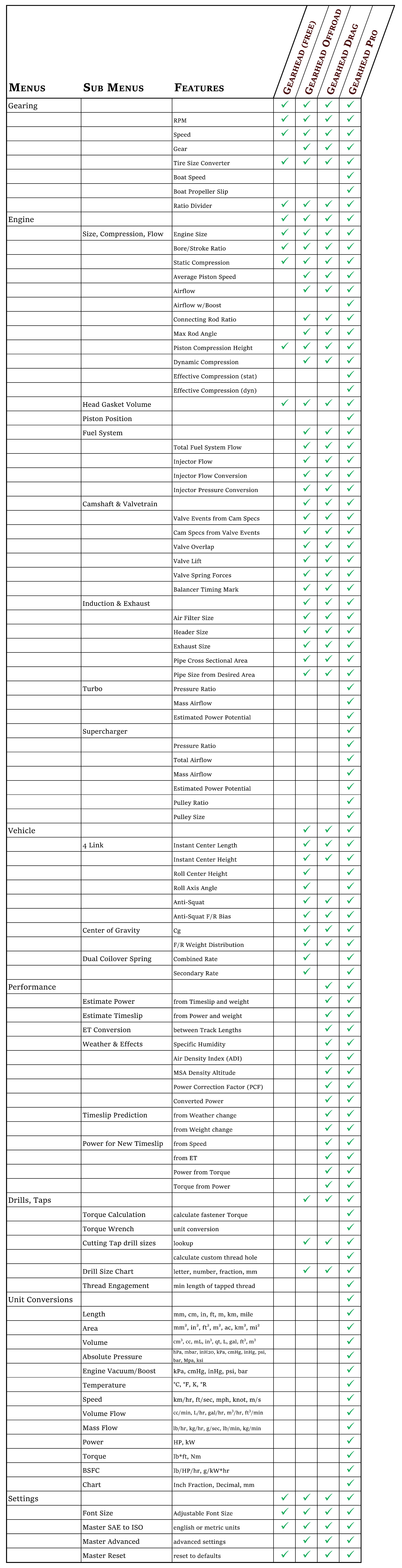
As for the differences, I will link the chart here....

Comparison-List-C.jpg
 
Last edited:
Thank you and let me know what you think, you may be the first one to purchase it through Apple so let me know if the process doesn't work. One thing that doesn't work with the apple version that I will try to fix in the future but I have no idea why as it works fine in the code in both Safari and Chrome(it's webapp based). The "font size" slider in the settings menu that I never use on the phone but could be handy for a tablet and tired eyes. For some reason when you use apples Xcode to wrap the webapp into an ipa file that one feature stops working. But functionally everything is good.

As for the differences, I will link the chart here....

Comparison-List-C.jpg
That was the chart I was looking for, but I gave up because now I have all of the green checks so who cares.

I only played with the 4 link thing so far for about two minutes before I took a nap.
It was just enough to realize I don’t know shit about how suspensions are designed enough to even fill in good info.
 
Well hopefully you were going to take a nap anyway, I didn't think my app was boring. ;)

There is a diagram if you click info on the top right of any screen to get information/instructions. It shows how to measure your suspension, or your planned suspension. Basically all you do is measure the distance from the ground up, from the axle forward, and the width(spread) (for roll axis stuff). And there is an "info" button on the top right of any calculation screen. The only ones that have diagrams are the ones I felt weren't as obvious with the text instructions.

Once you get a baseline you can play with the numbers to see what happens. Such as moving the two frame height dimensions to simulate what happens with ride height adjustments, or moving the frame or axle mounting points up, down, in, out, etc. Your version also does the roll axis so it is 3 dimensional instead of just 2D from the side as in instant center only stuff. But you can turn that off if you only want the IC and anti squat (for low travel stuff with near zero allowed articulation)

If you have any questions or feedback let me know.
 
It's a normal question, I put the answer in the instructions sheet for the main home page. Unfortunately with the Apple keypad the decimal is not on the main number pad, nor is it even listed, but it is there. The easiest way to input a decimal, tap the +*# button to go to that keypad, then tap "*" for the decimal. It's not intuitive but unfortunately that's the way the Apple keypad works, wish there was something I could do.

Do you think I should add this info somewhere else as I am sure it will be a common question since its not intuitive that the asterisk is the decimal. Once you know it it's easy and just an extra tap but it's far from obvious. But I'm sure not everyone will go look at the main instructions. Maybe I should put it in the app description?
 
Last edited:
It's a normal question, I put the answer in the instructions sheet for the main home page. Unfortunately with the Apple keypad the decimal is not on the main number pad, nor is it even listed, but it is there. The easiest way to input a decimal, tap the +*# button to go to that keypad, then tap "*" for the decimal. It's not intuitive but unfortunately that's the way the Apple keypad works, wish there was something I could do.

Do you think I should add this info somewhere else as I am sure it will be a common question since its not intuitive that the asterisk is the decimal. Once you know it it's easy and just an extra tap but it's far from obvious. But I'm sure not everyone will go look at the main instructions. Maybe I should put it in the app description?

You need to use the other “text” keyboard that has the options to switch to text or numbers.
 
You need to use the other “text” keyboard that has the options to switch to text or numbers.

Is this something in the phone settings? Its not in my borrowed iPhone 6 max I have. And when I use the simulators for the newer phones it still uses the mac keyboard, so I can't test that portion on newer phones. It's not an option I'm aware of in the app creation as I used a software to create a web based app and then used Xcode to package it and everything I was told by that software manufacturer the webapp locks the keyboard.

However, now that I think about it, since I used Xcode to package it(which was more recent) I will look into whether or not that would allow a different keyboard to be used. Sometimes when you work with something specific for so much time, when you switch to something else, you still feel trapped under the same previous limitations. (I was trying to avoid buying a mac for a while but it just became too time consuming trying to get around it). There may be a way in Xcode, I will check, but I can't guarantee it. Thank you.

I do have another question, if you have to click between letters and numbers, wouldn't that be more more clicking more often than having numbers there all the time for a calculation app? You don't ever have the need to input letters in this app...
 
Last edited:
Is this something in the phone settings? Its not in my borrowed iPhone 6 max I have. And when I use the simulators for the newer phones it still uses the mac keyboard, so I can't test that portion on newer phones. It's not an option I'm aware of in the app creation as I used a software to create a web based app and then used Xcode to package it and everything I was told by that software manufacturer the webapp locks the keyboard.

However, now that I think about it, since I used Xcode to package it(which was more recent) I will look into whether or not that would allow a different keyboard to be used. Sometimes when you work with something specific for so much time, when you switch to something else, you still feel trapped under the same previous limitations. (I was trying to avoid buying a mac for a while but it just became too time consuming trying to get around it). There may be a way in Xcode, I will check, but I can't guarantee it. Thank you.

I do have another question, if you have to click between letters and numbers, wouldn't that be more more clicking more often than having numbers there all the time for a calculation app? You don't ever have the need to input letters in this app...

Users don’t have to keep it on the text “side”. Here’s a sample I just took on my phone.
A5B94D59-A4DA-4DC5-87F9-71BA38D39E93.jpeg
 
There’s also this one which may be what you want

View attachment 311327

View attachment 311328

Is this something you can turn on in your phone? Because I tried it with this one and I couldn't get that to happen. I went to settings...general...keyboard...

I think the problem is the default is the phone dialing keypad, and not a more useful number keypad. It doesn't make sense otherwise to have a number pad with no decimals.

Honestly knowing that I need to use asterics Instead of period is good enough for me.

This is what I see.

View attachment 311329

View attachment 311330

This is what I see as well. The asterisk is so easy to use its simple once you know but it would be nice if the decimal was on the same screen as bp mentioned above, just less screen taps when you need the decimal.
 
Is this something you can turn on in your phone? Because I tried it with this one and I couldn't get that to happen. I went to settings...general...keyboard...

I think the problem is the default is the phone dialing keypad, and not a more useful number keypad. It doesn't make sense otherwise to have a number pad with no decimals

There’s different keyboards that come up with different apps. I don’t have to switch any settings around. I suspect the app controls which keyboard o use, but maybe not so obvious how to do it I guess.
 
There’s different keyboards that come up with different apps. I don’t have to switch any settings around. I suspect the app controls which keyboard o use, but maybe not so obvious how to do it I guess.

I think you are right, that would be ideal. The way the keypad is now, it works, but its not intuitive.

I'll look into it, but it reaches my limitation of not knowing any code. If I can find a tutorial it helps. The problem is, it's worse than learning a new language, because at least with that you have some leeway. With the programming if you are off by one space or a letter case or anything it doesn't work, or worse yet it crashes. And most tutorials assume you know the basic code or grammar, and I don't, which makes it extremely time consuming to make changes. This is definitely up there on the list for updates.
 
I have done more research and it appears apple does not allow the "decimalPad" as they call it to work from webapps via HTML code. So I have asked in the developer forums if its possible to force the decimalPad using the Webkit in Xcode (What I am using now). We'll see what they say, the current setup may be the best option for iOS at this time. I'll keep you posted.
 
Top Bottom