CK5
Register an account today to become a member! Once signed in, you'll be able to participate on this site by adding your own topics and posts, as well as connect with other members.

Supercharger fix;guage & plugs question

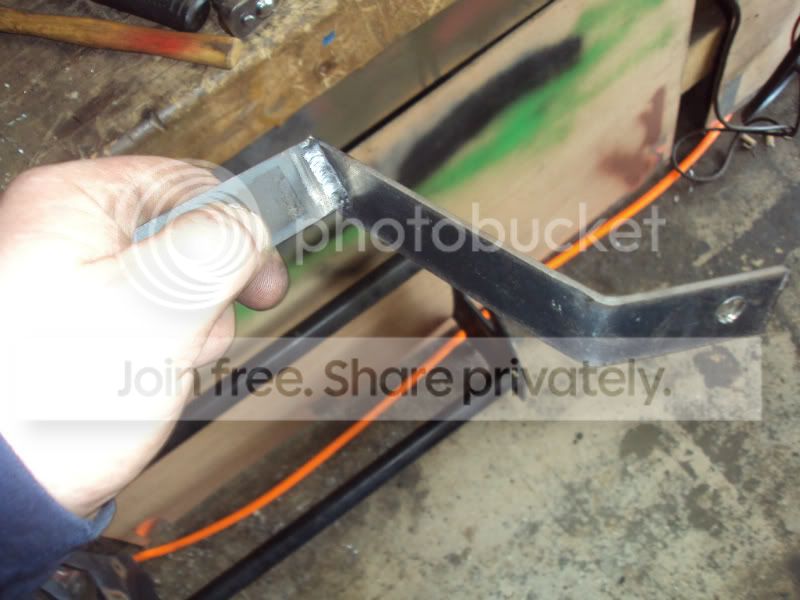
Ok so until I can get a angled drill of sorts, I made a few quick measurements and fab'd up a temporary support that mounts to one of the motor studs. I is Very sturdy and lines up directly with the broken stud.:waytogo:

Bracketbrace-1.jpg


Was a quick put together so don't laugh, I swear I'm not going to leave it like this :haha:


ANY idea where I can find this clip that holds the TV Cable ??
 
Soft 'stacked' shifts indicates TV adjustment is bad. Basically shifts way too soon into gear after gear...

The other extreme is delayed shifts that are really harsh...
 
Would this be about right? :rolleyes:


http://youtu.be/CQlCkb_eIpA


When it's time to test drive, how would one know if everything is correct? Any signs if it's not correct? The shifting pattern etc?

Thanks Fellas

I've never seen it done that way.. I always slide the sheath towards the firewall, release D, go to full throttle.. done... it will usually click the sheath a couple clicks towards the tb..

that's like the opposite and seems like there'd be more room for error...
 
Soft 'stacked' shifts indicates TV adjustment is bad. Basically shifts way too soon into gear after gear...

The other extreme is delayed shifts that are really harsh...


Cool, THANKS! SO, basically if it doesn't seem right. :D
 
Basically...:haha:

Just letting you know what to watch for if the TV cable isn't set right. I had to do mine two or three times, I guess the cable was a bit sticky or something. At least I now have a tranny that shifts when it's supposed, not harsh shifting etc. When I bought the truck i thought the tranny was just hammered from age and miles (268,000 miles) Turns out it's a little tired but was mostly that the TV cable wasn't set at all. seems like someone depressed the "D" but didn't know what to do from that point onward.
 
I've never seen it done that way.. I always slide the sheath towards the firewall, release D, go to full throttle.. done... it will usually click the sheath a couple clicks towards the tb..

that's like the opposite and seems like there'd be more room for error...


I tried basically hooking up the cable, and depressing the "D" , full throttle, listened for clicks and heard none, then released. Tried a few times, slightly different variations , to include the one in the video. I never heard any sort of "click". It does have , what I would call good tension.

That "D" in dent dude, It seems stiff. Are they normally like this? Meaning does it take a bit of force to push in? I'm not a small guy and I was putting some "oooph" into it. To be on the safe side, I am ordering a new TV cable all together. But Id certainly like to drive it before then!!! :tongue1:

Thanks!
 
Yes the 'D' is a very firm push. I used a large screwdriver cuz it hurt my thumb too much...
 
depressing the "D" , full throttle,


your missing a step.. get the, yes, difficult to press "D" button (a squirt of silicone will improve that a bit) pressed in... while pressed in pull the sheath from behind the bracket.. the sheath will bottom out on the exposed side..

RELEASE D BUTTON... then go to WOT
 
yeah, that adjustment vid sucks....


listen to these guys here^^^
 
"get the, yes, difficult to press "D" button (a squirt of silicone will improve that a bit) pressed in... while pressed in pull the sheath from behind the bracket.. the sheath will bottom out on the exposed side..

RELEASE D BUTTON... then go to WOT"


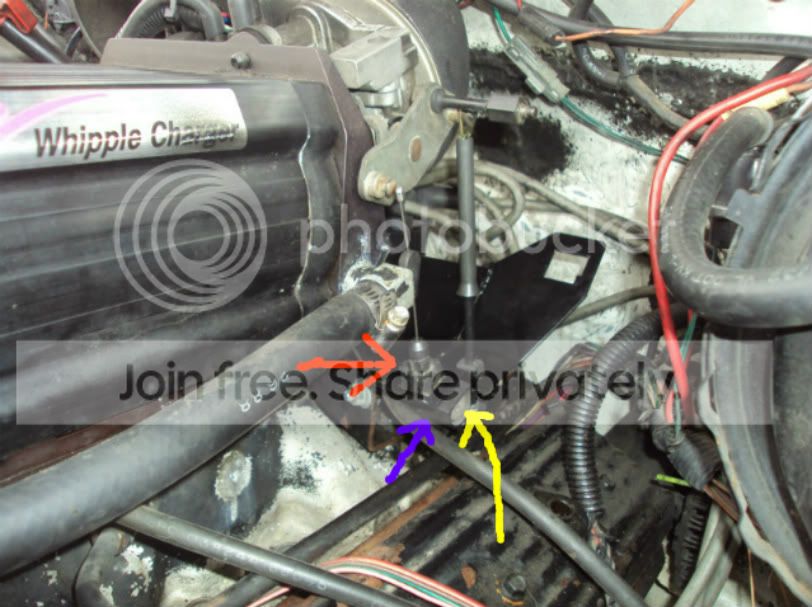
bracketWOT-1-1-1.jpg
 
Well, I feel like a total Nincompoop !:whistle:


Press the "D" (Yellow arrow), Push the "sleeve" (red arrow) towards the trans (Blue arrow). (I meant to write that in my last pic, my bad). I did this, and I heard the "ratchet" or click. :eek1: Unfortunate for me, The little plastic "clip" is broken, and my little jimmy rig didn't hold. I won't be tring to do that again.:shame: I ordered a replacement clip for a buck plus shipping.

detentrepairclip.jpg


I ordered that replacement, and a new TV cable as well. I may just replace the cable and keep the clip in my back up.

I'm exited to to drive my truck again!! Will post when that clip gets here.

Thanks again VERY much for all your help and support for a newb! :bow:
 
Ok, So I got the "repair clip" and the new TV Cable in the mail today. I installed the repair clip and adjusted per directions. The cable was so stiff that about half way through to WOT it broke the repair clip. :mad: I didn't expect much from a $1.00 piece of plastic.

SO, I went ahead and replace the cable. After getting it all put in and hooked up I went through the paces yet again, same as above. About half way, get hella stiff. This time I didn't let it break the clip.


I was thinking, due to the "new geometry" and angle, It needed a little slack. SO, I pushed in the "D" button and moved the sleeve about 70-75% OUT towards the throttle linkage. Tried again and I was able to get to WOT and maintain a "guitar string" type tension.


per this web site linked to me : http://www.cpttransmission.com/tech_tvcable.htm

"4. Check the TV cable to insure that it is the right part for the vehicle. If you do not hear at least one "click" from the TV cable during the adjustment procedure, it may be the wrong part. "

I DID hear what I think was two rapid clicks, possibly just one.


I do not think it's anything do due with the plunger linkage connected to the valve at the tranny. When replacing the cable, I was easily able to pull that (plunger linkage) out feeling the TV Plunger operate and it spring back.


I want to test drive and see how it shifts and if not within specs perhaps snug it up a bit more. If y'all agree.


This is probably a loaded question but... Any opinions?? :haha:
 
Last edited:
As long as the cable operates from closed to wide open throttle it sounds good. At least a good start.

Sticking at half throttle or binding and breaking the clip sounds like a bad cable or too short cable. Either way, replacing it was the right idea.
 
Cool Thanks :thumb:


I noticed that the sleeve on the old cable was much shorter than the new one. The new sleeve slides out like 3 in vs. the old only slid out maybe 1".
 
Okay, so I got to go for a test drive today. The trans seems happier now. Quick couple questions:

The trans shifts at the right times but seems to shift pretty hard. Is this a tighter TV cable or little more slack?

2ndly, The idle is just a tad low, anyone one know how to adjust the idle on a SC motor?:haha:
 
Try giving the cable a bit of slack, see if that softens up the shifts without effecting the shift points (or shift timing). I would guess the PO installed a shift kit in the trans to go along with that SC.

Is there a throttle body on the firewall side of the SC? Specifically the original TBI unit? If so, base idle may need to be set. Do some searching on "TBI base idle" in google. You should come up with something. It's also possible the IAC is not working at all. That's the Idle Air Control solonoid. That is controlled by the computer to set/change idle speed.
 
Try giving the cable a bit of slack, see if that softens up the shifts without effecting the shift points (or shift timing). I would guess the PO installed a shift kit in the trans to go along with that SC.

Is there a throttle body on the firewall side of the SC? Specifically the original TBI unit? If so, base idle may need to be set. Do some searching on "TBI base idle" in google. You should come up with something. It's also possible the IAC is not working at all. That's the Idle Air Control solonoid. That is controlled by the computer to set/change idle speed.


Thanks 496, I did just that, giving the TV a little more slack seems to be the ticket. It shifts much smoother, and seems to shift in the right order.

Yes, the TB is between the SC and the firewall, I doesn't look to be the original TBI unit, at least not compared to any pics I have seen of the TBI:haha:


Thanks for the reply
 

Latest Posts

Top Bottom