
CK5

You are using an out of date browser. It may not display this or other websites correctly.
You should upgrade or use an alternative browser.
You should upgrade or use an alternative browser.


On my S-10 I switched to an internal slave cylinder. It works great and gets it out of the way.
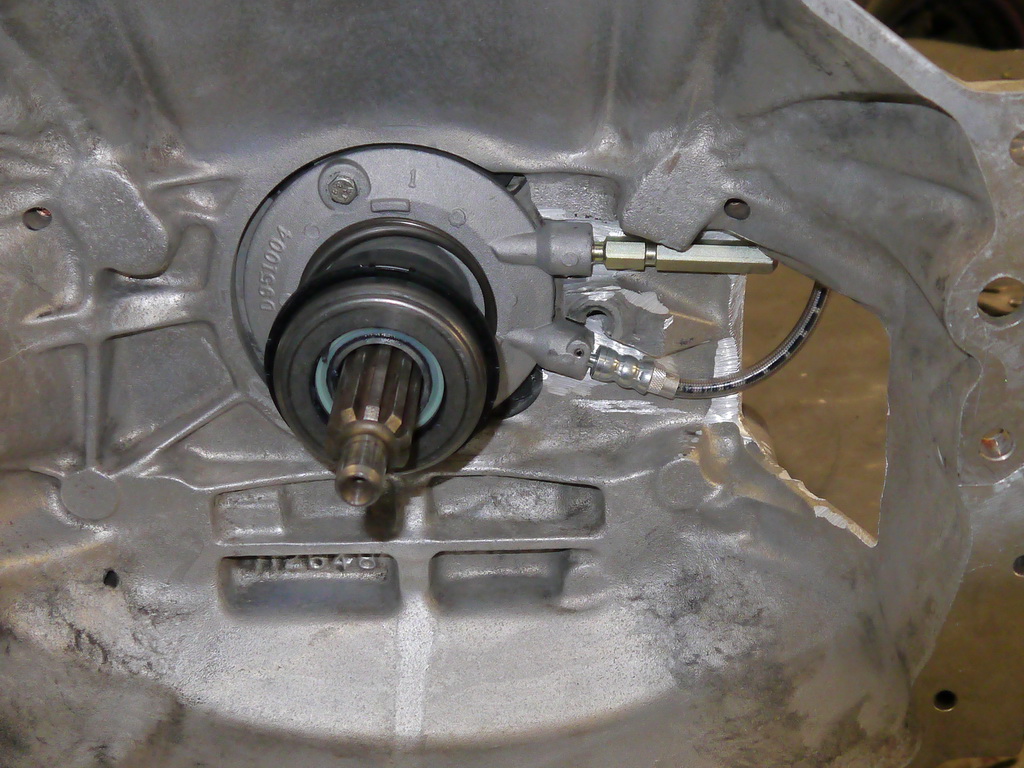
On my 72 Blazer I kept the LQ4 manifolds and had to do some interesting routing of the exhaust to get it around the slave cylinder. I cut the factory flanges off and welded v-band clamp flanges on to get the clearance around the frame, but still had to notch it a bit.
This was the y-pipe configuration for the Blazer:
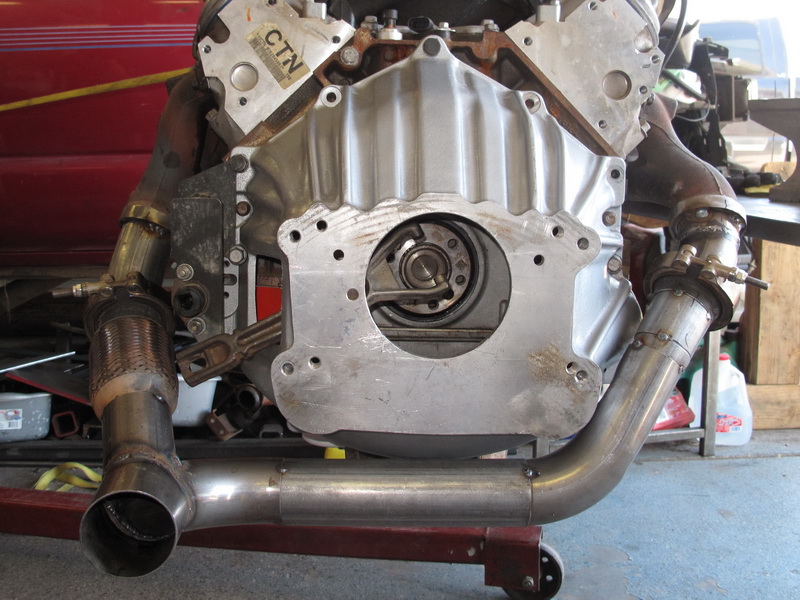
On my 72 Blazer I kept the LQ4 manifolds and had to do some interesting routing of the exhaust to get it around the slave cylinder. I cut the factory flanges off and welded v-band clamp flanges on to get the clearance around the frame, but still had to notch it a bit.
This was the y-pipe configuration for the Blazer:

Thanks for that reddog. I'm glad to hear that it works. Relocating the slave inside the bellhousing seems like the best plan. I see in your pic you had to clearance the bellhousing a bit to get it in there.On my S-10 I switched to an internal slave cylinder. It works great and gets it out of the way.
Which bellhousing are you using? Is that an AA bellhousing?
Any other modifications you had to make?
I picked up the NV4500 in my S-10 from Craigslist and it came with the AA bellhousing. I had to modify it to work as you can see in the pictures.
If I didn't have the AA bellhousing I would have bought one of the later model bellhousings that is designed to use the internal slave. They look like this:

In fact, if I can get my hands on one of those I may pull it apart and swap it out anyways since it will bolt to the oil pan on my S-10 like the NV3500 would have.
The only other thing you would need is the input bearing retainer that has the bolt holes to bolt the slave to it. My tranny was a newer one so it already had that. If you have an older transmission you'll have to buy one of these:
http://www.quad4x4.com/qu10704.html
If I didn't have the AA bellhousing I would have bought one of the later model bellhousings that is designed to use the internal slave. They look like this:
In fact, if I can get my hands on one of those I may pull it apart and swap it out anyways since it will bolt to the oil pan on my S-10 like the NV3500 would have.
The only other thing you would need is the input bearing retainer that has the bolt holes to bolt the slave to it. My tranny was a newer one so it already had that. If you have an older transmission you'll have to buy one of these:
http://www.quad4x4.com/qu10704.html
right on, thanks!
I have the AA bellhousing on there now but I would imagine I could trade it or sell it and get a regular bellhousing without too much trouble.
I have the AA bellhousing on there now but I would imagine I could trade it or sell it and get a regular bellhousing without too much trouble.
Well, the day started out good. Got another piece of the puzzle.
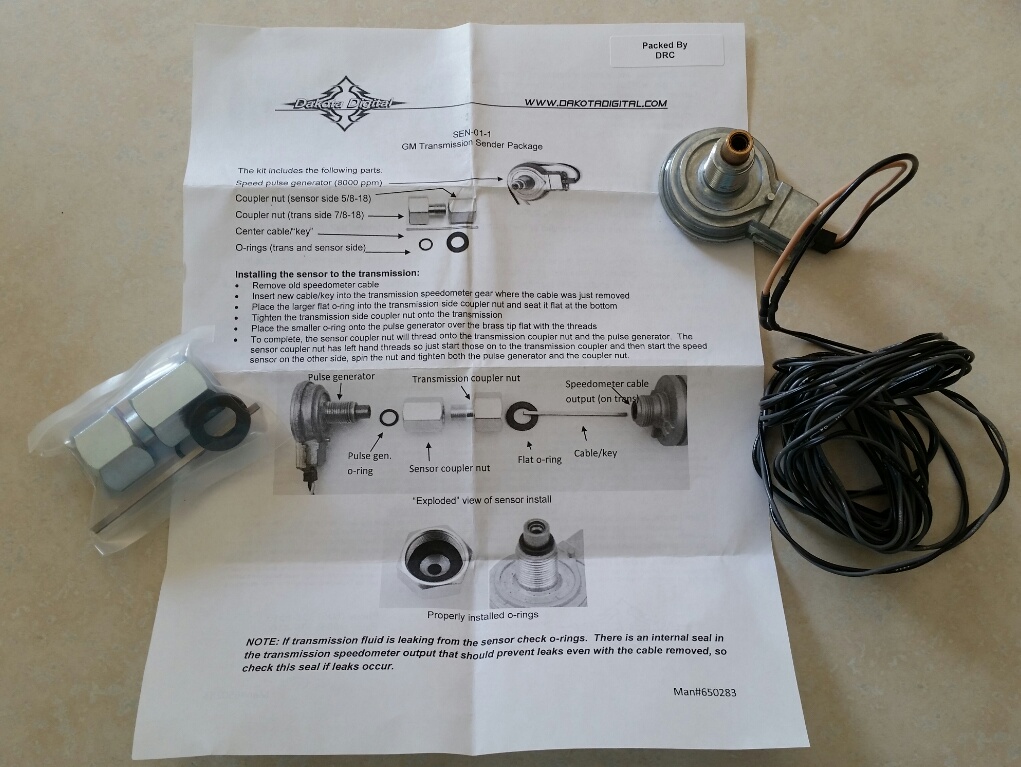
sending unit only $30.
My intention was to be able to post a nice new milestone tonight, but things don't always go as planned.
I finished building my new battery tray so that I could move the battery to the drivers side.
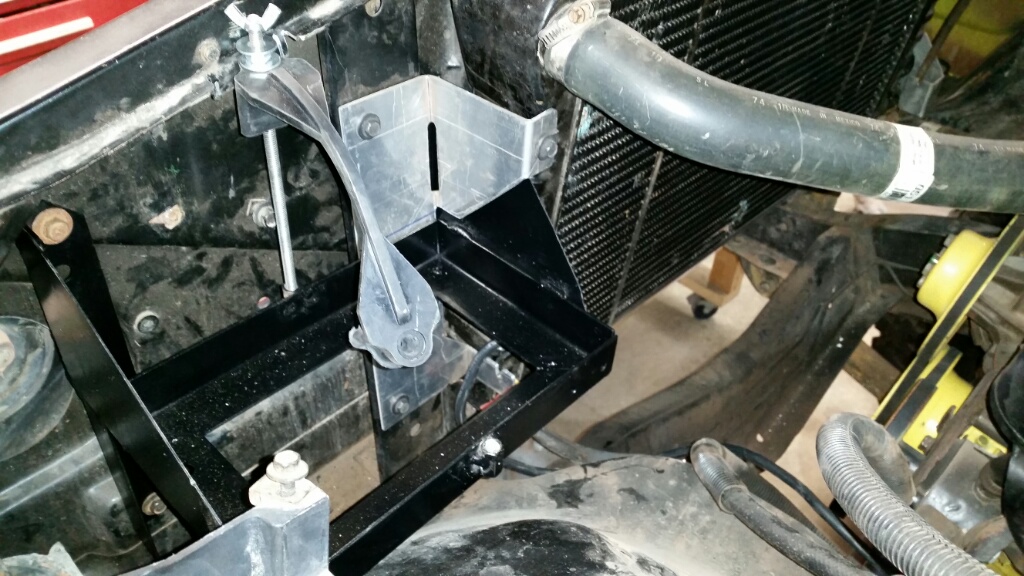
All ready for the battery, complete with a better strap down system so that hopefully I won't repeat the carnage from BB13
Anyway, once that was done, I got to work modifying the stock wiring harness to fit the battery in the new position, get rid of any extra wires I wouldn't need and incorporate my new underhood fuse/relay box. I pulled the entire wiring harness out and fixed quite a few questionable wiring "mods" that had been done over the years and then reinstalled it.
One of my goals with every project I undertake with the blazer is to keep it drivable as much as possible. I really don't want to end up with nothing but a 1/2 finished piece of garage art and the longer it sits unmoving, the closer it is to being just that.
So with that in mind, I reinstalled the wiring with my "upgrades" and set about making sure the truck was drivable again while I finished gathering the rest of what I need to actually drop the 6.0 in.
Once I got everything hooked up, I turned the key and the truck started right up! Success... or so I thought. I started testing various electrical system, until I got to the blinkers.
Truck dies. No electrical at all. The good news is that the new fuse box did it's job and promptly blew the 30a fuse that provides power to the interior of the truck. The bad news is that I didn't have another 30a, so I dropped in a 40a to try and trace out the problem.
That's when the magic smoke got out.
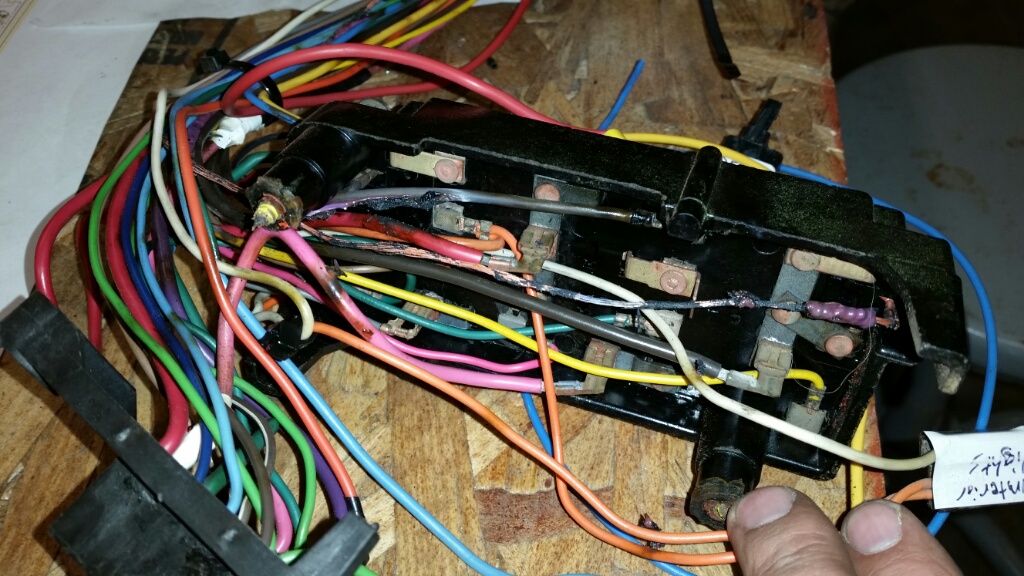
As you can see, the purple wire melted up good. It's the power lead to the flasher so I probably fried that too.
At first I was sure I screwed up the rewiring somewhere, but I was very careful so after initial panic I pulled the harness back out and it turns out it was a routing problem.
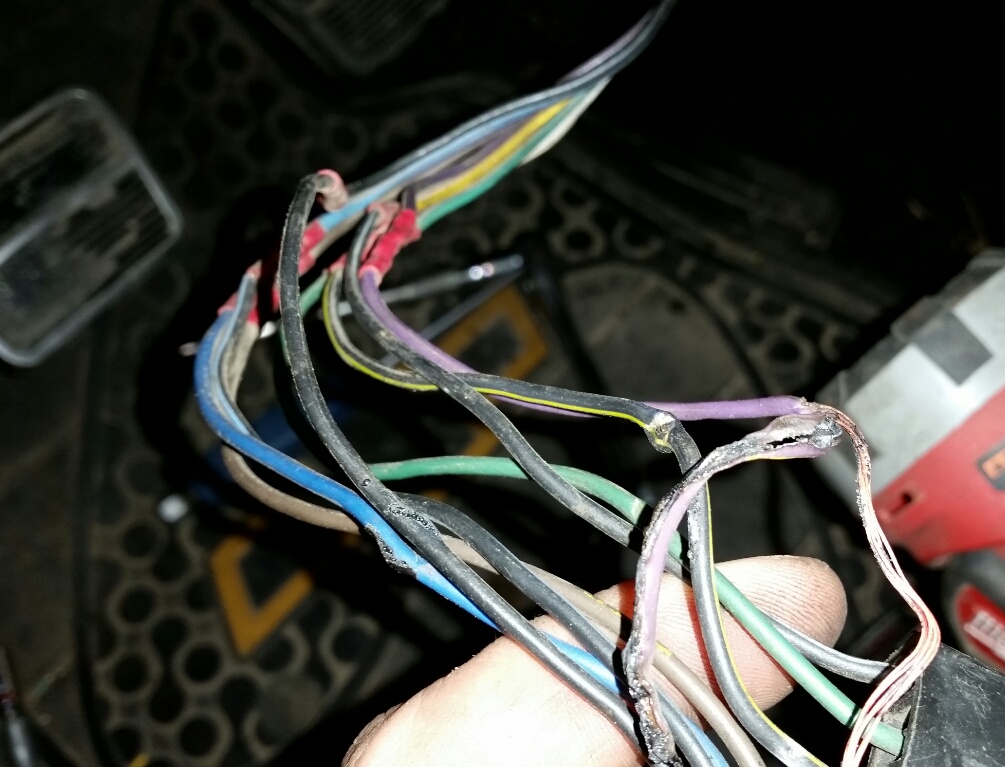
I was able to trace the burnt wire up through the steering column connector to the point you can see in the pic. The burnt wiring stops right there and you can see the black/yellow wire right next to it is crimped through to bare wires.
I managed to smash these 2 wires between the column and the dash, causing a short.
So it's a setback, but at least it's only 1 burnt wire (and a couple of fuses).
Lesson learned, 30a fuse is the biggest I want on that circuit. Hopefully I'll be able to post about the truck up and running again tomorrow. I've got to get at least one more trip into the mountains before the weather turns bad!
sending unit only $30.
My intention was to be able to post a nice new milestone tonight, but things don't always go as planned.
I finished building my new battery tray so that I could move the battery to the drivers side.
All ready for the battery, complete with a better strap down system so that hopefully I won't repeat the carnage from BB13
Anyway, once that was done, I got to work modifying the stock wiring harness to fit the battery in the new position, get rid of any extra wires I wouldn't need and incorporate my new underhood fuse/relay box. I pulled the entire wiring harness out and fixed quite a few questionable wiring "mods" that had been done over the years and then reinstalled it.
One of my goals with every project I undertake with the blazer is to keep it drivable as much as possible. I really don't want to end up with nothing but a 1/2 finished piece of garage art and the longer it sits unmoving, the closer it is to being just that.
So with that in mind, I reinstalled the wiring with my "upgrades" and set about making sure the truck was drivable again while I finished gathering the rest of what I need to actually drop the 6.0 in.
Once I got everything hooked up, I turned the key and the truck started right up!
Success... or so I thought. I started testing various electrical system, until I got to the blinkers.Truck dies. No electrical at all. The good news is that the new fuse box did it's job and promptly blew the 30a fuse that provides power to the interior of the truck. The bad news is that I didn't have another 30a, so I dropped in a 40a to try and trace out the problem.
That's when the magic smoke got out.
As you can see, the purple wire melted up good. It's the power lead to the flasher so I probably fried that too.
At first I was sure I screwed up the rewiring somewhere, but I was very careful so after initial panic I pulled the harness back out and it turns out it was a routing problem.
I was able to trace the burnt wire up through the steering column connector to the point you can see in the pic. The burnt wiring stops right there and you can see the black/yellow wire right next to it is crimped through to bare wires.
I managed to smash these 2 wires between the column and the dash, causing a short.
So it's a setback, but at least it's only 1 burnt wire (and a couple of fuses).
Lesson learned, 30a fuse is the biggest I want on that circuit.
Hopefully I'll be able to post about the truck up and running again tomorrow. I've got to get at least one more trip into the mountains before the weather turns bad!
Sounds like that almost got interesting. 
small update. I managed to replace the burnt wire and confirm that everything else was hooked up correctly.
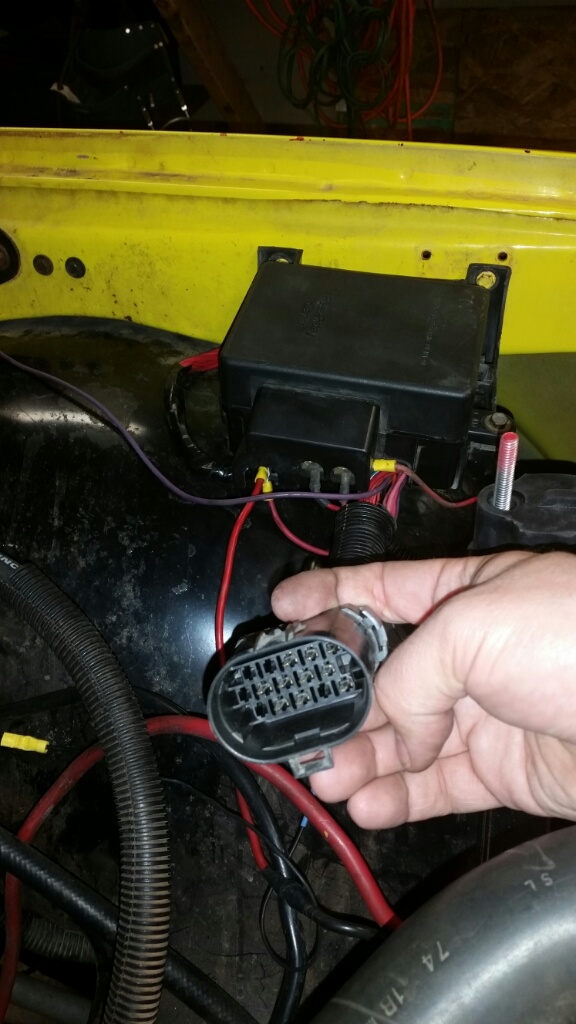
Here you can see I have the new underhood fuse/relay box installed and wired in. I found the 15 pin weather proof connector in the junkyard and it is now my connection between the fuse block and the engine harness. There are a couple of wires you can see in the background that will be removed when the new engine goes in. The purple goes to the starter and there are a couple of others for the alternator and electric fans. Once those wires are added to the connector it will clean things up the rest of the way.
With the truck back up and running I plan on hitting the mountains to enjoy the fall colors a few times before I bring it back in and pull the old engine.
Here you can see I have the new underhood fuse/relay box installed and wired in. I found the 15 pin weather proof connector in the junkyard and it is now my connection between the fuse block and the engine harness. There are a couple of wires you can see in the background that will be removed when the new engine goes in. The purple goes to the starter and there are a couple of others for the alternator and electric fans. Once those wires are added to the connector it will clean things up the rest of the way.
With the truck back up and running I plan on hitting the mountains to enjoy the fall colors a few times before I bring it back in and pull the old engine.

y5mgisi
1 ton status
Nice!
I was just about to start building my connection between the engine wiring harness and my gauges and I think I'm missing something. I have a wire out for my tach signal and speedometer but no temp gauge.
Does the PCM not supply a signal to run a temp gauge? I can't find anything in the documents I have.
Does the PCM not supply a signal to run a temp gauge? I can't find anything in the documents I have.
y5mgisi
1 ton status
Nope. Temp gauge works as it did originally on the 72.

You'll need to install a sending unit for the temperature gauge.
y5mgisi
1 ton status
Oh, right, yes, that! Haha! there are tons of options on how to do it, but basically, you need to mount a temp sending unit somewhere for the gauge. I took my oeriganl 90 suburban temp sender and turned it down to 12x1.5 thread and installed in the passenger head at the rear port. Worked perfect.
Alright, it just seems weird that you basically have to have 2 separate temp sensors. How is the stock gauge run?
Anyway, Like I said, I managed to get the truck up in the mountains for awhile today so I'll make with the pics.
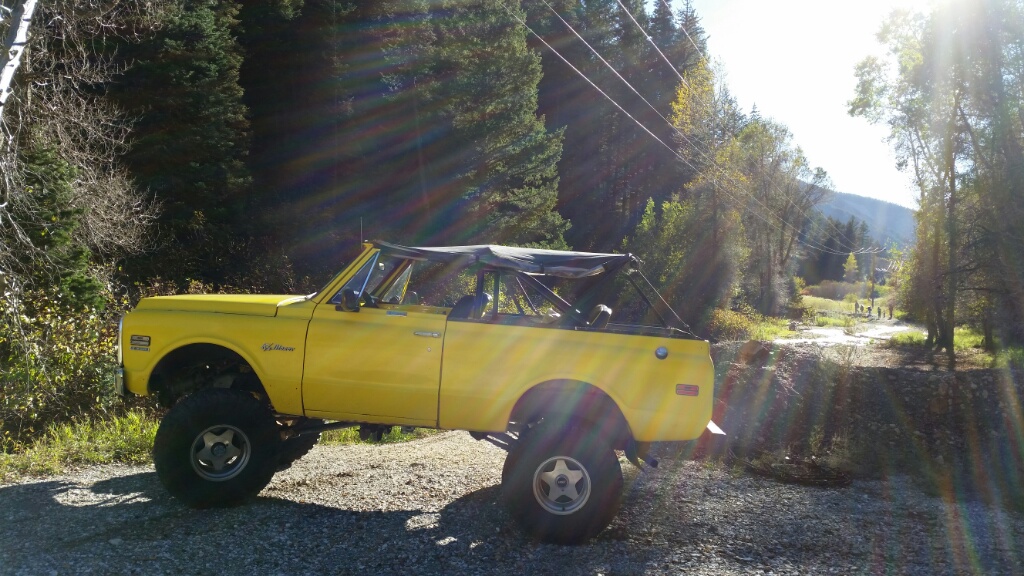
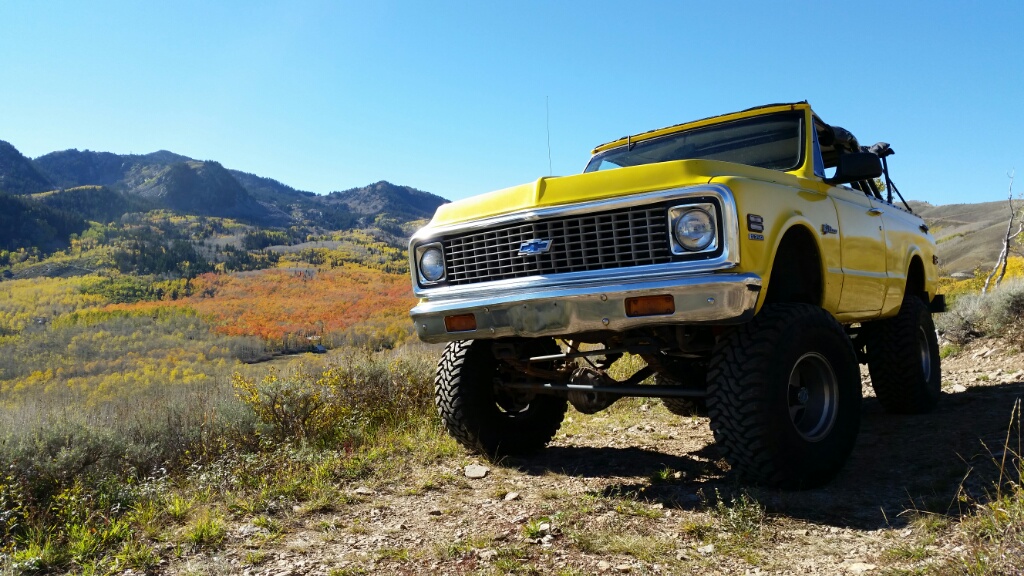

Anyway, Like I said, I managed to get the truck up in the mountains for awhile today so I'll make with the pics.
I did some searching and found a few different ways of mounting the sending unit. This thread was helpful:Oh, right, yes, that! Haha! there are tons of options on how to do it, but basically, you need to mount a temp sending unit somewhere for the gauge. I took my oeriganl 90 suburban temp sender and turned it down to 12x1.5 thread and installed in the passenger head at the rear port. Worked perfect.
http://www.ls1.com/forums/f124/how-install-gauges-your-ls-swap-161175/
- Using the coolant plug in the passenger head http://viglink.pgpartner.com/rd.php...passenger-head-light/&st=feed&mt=~~~~~~~~n~~~near #8 plug.
- Using the block freeze plug by tapping it for a sensor.
- Using a radiator hose adapter.
- Or using a brass tee in the coolant bypass/steam hose.
After a bit more looking, I found out that autometer makes an adapter for the head and a different sending unit to fit that adapter.
Sending unit #2259
adapter #2277
Amazon and summit had them both for about the same price, but since I have prime I used amazon for the free shipping. I got both pieces on the way for $24.
Some gauge fun:
I plan on mounting the new autometer gauges in my stock cluster bezel. The speedo and tach fit perfectly but the rest of the smaller gauges would need to have the holes widened a bit. My bezel is in pretty good shape so I wasn't relishing the idea of taking a hole saw to it and I was concerned about being able to get a clean cut since the hole only needed to be widened about 1/8th". So, with that in mind, I found this at the junkyard yesterday:
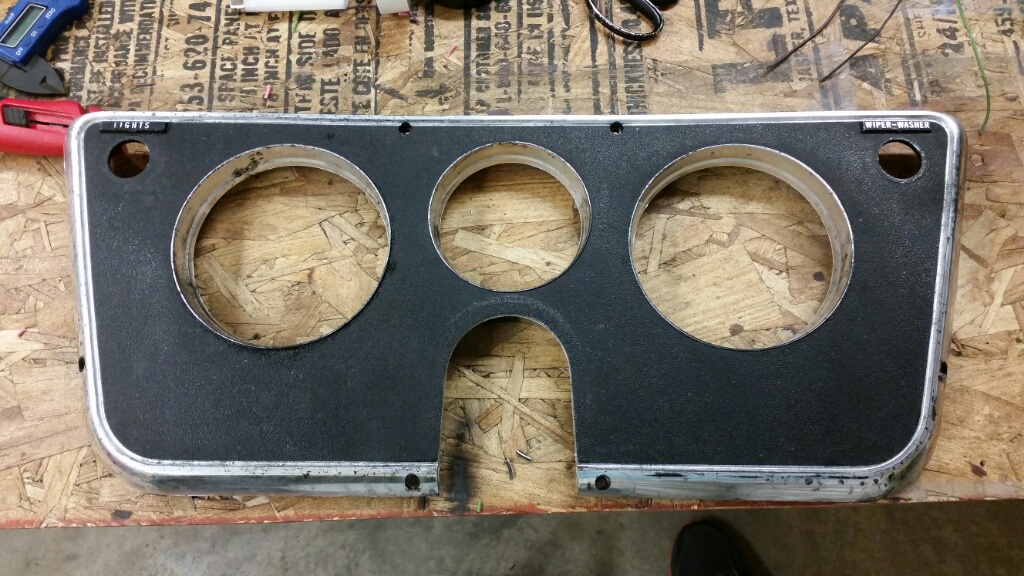
For only $8 I couldn't pass it up. It gives me a nice flat surface for drilling and mounting the smaller gauges, saves me from cutting into a nice piece I already have, and lets me work on mounting the cluster without having to take the truck out of action.
While I was there I also found a random instrument cluster laying out so I yanked out the light covers for the lights I'll need to run as well.
After a bit of cutting, I ended up with this:
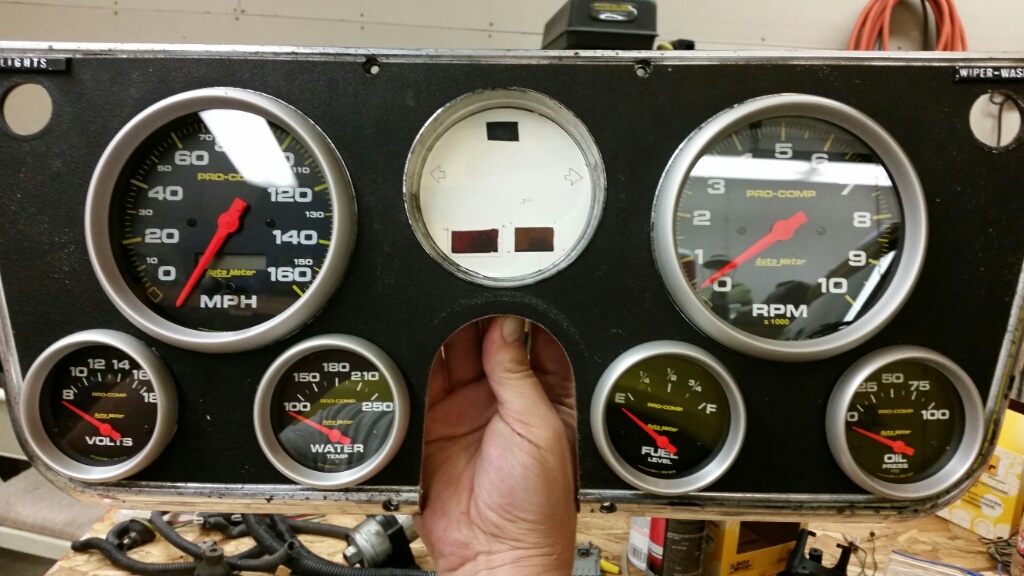
With a light behind it:
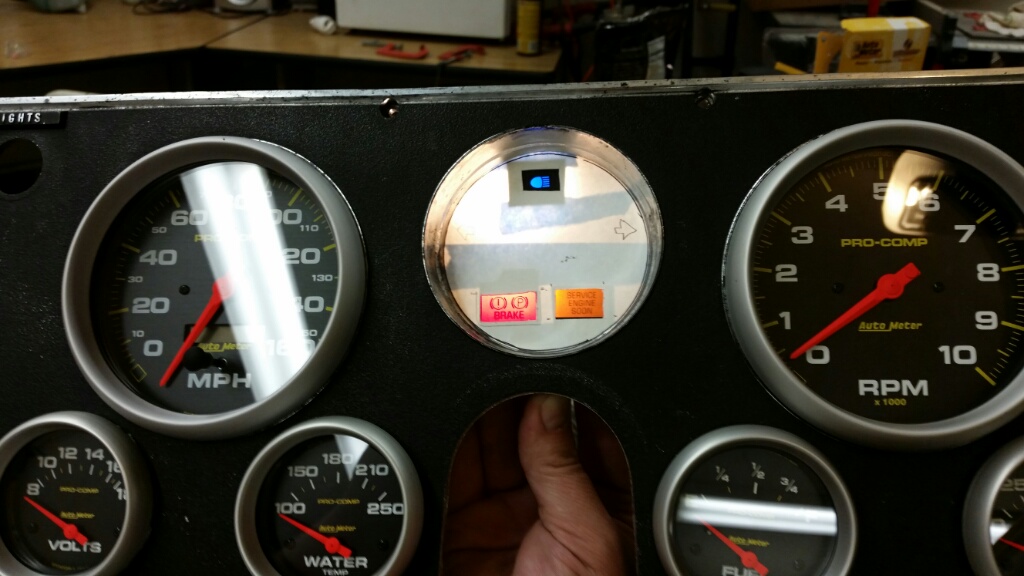
I didn't realize until I started on it that this cluster doesn't have separate blinker holes so I'll relocate them into the center section as well.
Once that white paper in the center is a proper smoked black plastic piece and the bezel is repainted, I think it will turn out pretty good.
I plan on mounting the new autometer gauges in my stock cluster bezel. The speedo and tach fit perfectly but the rest of the smaller gauges would need to have the holes widened a bit. My bezel is in pretty good shape so I wasn't relishing the idea of taking a hole saw to it and I was concerned about being able to get a clean cut since the hole only needed to be widened about 1/8th". So, with that in mind, I found this at the junkyard yesterday:
For only $8 I couldn't pass it up. It gives me a nice flat surface for drilling and mounting the smaller gauges, saves me from cutting into a nice piece I already have, and lets me work on mounting the cluster without having to take the truck out of action.
While I was there I also found a random instrument cluster laying out so I yanked out the light covers for the lights I'll need to run as well.
After a bit of cutting, I ended up with this:
With a light behind it:
I didn't realize until I started on it that this cluster doesn't have separate blinker holes so I'll relocate them into the center section as well.
Once that white paper in the center is a proper smoked black plastic piece and the bezel is repainted, I think it will turn out pretty good.

With that new motor going in, I just hope 160MPH is enough........ 
-G
-G
If the needle ever makes it to the 2nd half of that gauge there is a good chance they'll be picking me off the road with a spatula. lol

bp71k5
3/4 ton status
I was going to say that you may be able to cut the bezel off the gauges to make them fit behind the original dash without cutting it. That's how I did mine.
I was going to say that you may be able to cut the bezel off the gauges to make them fit behind the original dash without cutting it. That's how I did mine.
I did it the same way... though it's tough to take screwdriver and pry the bezels from $500+ worth of brand new gauges right away.
The only downside that I've found is that over time, dust will get inside of the gauges and they won't look quite as good anymore. I'm sure I could disassemble the cluster and carefully clean them with a soft-bristle brush... but maybe next time around I'll spend a bit more time thinking about a better way to seal them in the cluster....

-G
Latest Posts
-

-

-

-

-
 '78 K20 - RootBreaker from 1990 - Sept 2026 8.1L running
- Latest: RootBreaker

