

And, if I remember right, correct me if I am wrong, the oxygen sensor starting to change voltages is one of the main triggers to put it into closed loop.Yes, closed loop means now the 02 sensor comes into play. It usually takes about 2 minutes for the system to go into closed loop operation.
CK5

You are using an out of date browser. It may not display this or other websites correctly.
You should upgrade or use an alternative browser.
You should upgrade or use an alternative browser.
Got my usb aldl cable. What now? *EDIT-NEW heated o2 data is up!!!.*
- Thread starter y5mgisi
- Start date

y5mgisi
1 ton status
lets see if this works,
y5mgisi
1 ton status
Nope! So how can i post the document? Its 356kb.

katugly
1/2 ton status
Just remember that the 02 sensor that is in these trucks is only accurate at stoichiometric. any thing over or under can be wildly wrong.
y5mgisi
1 ton status
Ok, Now how do i do that?? HA! Im such a newb...
y5mgisi
1 ton status
Speaking of o2, It went into closed loop a couple times. The o2 still never read above .022. not reved or "accelerating".
y5mgisi
1 ton status
Fordum, thanks for being so helpful and willing to help such a computer tard.
y5mgisi
1 ton status
Oh, also i shot a video on my phone. Wont tell anyone much probably but i will put it up on youtube here in a few and post a link.
OK, its been so long since I zipped a file I had to figure out how to do it in these newer Windows.
Here is hoping that Vista works like XP
Find the file, and right click on it.
You should have a menu come up that has "send to".
Click on that, and you should see compressed folder with a picture of a zipper on it.
Select that, and you should get a copy of your file with that zipped picture in the same part of the hard drive as the original.
It will have the same name, but will have .zip after it.
Depending on how your computer is setup, you may not see the .zip.
Try attaching that file.
Here is hoping that Vista works like XP
Find the file, and right click on it.
You should have a menu come up that has "send to".
Click on that, and you should see compressed folder with a picture of a zipper on it.
Select that, and you should get a copy of your file with that zipped picture in the same part of the hard drive as the original.
It will have the same name, but will have .zip after it.
Depending on how your computer is setup, you may not see the .zip.
Try attaching that file.
y5mgisi
1 ton status
ok just a sec.
y5mgisi
1 ton status
y5mgisi
1 ton status
Well it looks like it worked! One of you will have to open it to see if it actually did.
Thanks again fordum!
Thanks again fordum!
Well, all the data is there, but it does not seem to be formatted correctly.
Of course, it would help if I had seen one before.
I think I can import it into Excel and make it work.
I will play around with it later tonight. A friend just called. He had a security warning pop up on his screen and he clicked OK.
Now I gotta go scrub that malware off his machine.
Hang in there, we will get it whipped yet.....
Of course, it would help if I had seen one before.
I think I can import it into Excel and make it work.
I will play around with it later tonight. A friend just called. He had a security warning pop up on his screen and he clicked OK.
Now I gotta go scrub that malware off his machine.
Hang in there, we will get it whipped yet.....
y5mgisi
1 ton status
Its all good. Thanks a ton!
I dont know if this is cool to do or not, but i have posted this over on thirdgen.org(a camaro site) and they allow a bigger file upload. So if you click the link below there is a thing you can click that is my original text document.
link;
http://www.thirdgen.org/techboard/tbi/596124-anyone-wanna-take-look.html#post4749902
DANGIT!! You have to be a member to view it... Never mind.
I dont know if this is cool to do or not, but i have posted this over on thirdgen.org(a camaro site) and they allow a bigger file upload. So if you click the link below there is a thing you can click that is my original text document.
link;
http://www.thirdgen.org/techboard/tbi/596124-anyone-wanna-take-look.html#post4749902
DANGIT!! You have to be a member to view it... Never mind.

magik235
Still Alive
It worked for me. I found the actual windows in WINALDL more useful to me. See the samples below.Well it looks like it worked! One of you will have to open it to see if it actually did.
Thanks again fordum!
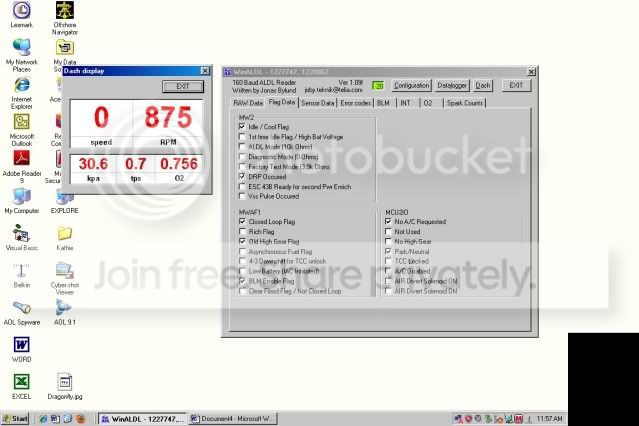
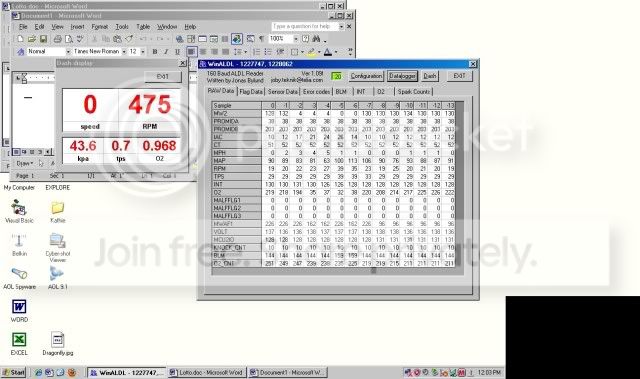
y5mgisi
1 ton status
Not exactly sure what you got goin on there magik. I did take just a couple screen shots that i suppose i could post.
y5mgisi
1 ton status
these two are it.


